#set hostname
echo "Enter hostname:"
read host_name
hostnamectl set-hostname $host_name

#set ist timezone
rm -rf /etc/localtime | exit 0
ln -s /usr/share/zoneinfo/Asia/Kolkata /etc/localtime

#increase history size
echo 'export HISTSIZE=10000
export HISEFILESIZE=10000' >> /root/.bashrc
Category: Uncategorized
Run shell script before shutdown – linux
before_shutdown.sh
#!/bin/bash
#remove file older than 7 days
find /var/log -name "*.log" -type f -mtime +7

#test
touch "/opt/before_shutdown_tmp_file_$(date +%s)"- Create systemd service
echo '[Unit]
Description=before_shutdown

[Service]
ExecStart=/bin/true
Type=oneshot
RemainAfterExit=true
ExecStop=/opt/before_shutdown.sh

[Install]
WantedBy=multi-user.target' > /etc/systemd/system/before_shutdown.service
systemctl daemon-reload
systemctl enable before_shutdown
systemctl start before_shutdownpython argument parser
consumer.py –server kafka:9092 –consumer_group group1 –topic test-topic1 –messages 100 –sleep 1
import sys
import time
import argparse

#consumer.py --server kafka:9092 --consumer_group group1 --topic test-topic1 --messages 100 --sleep 1

parser = argparse.ArgumentParser(description='Optional app description')
parser.add_argument('--server', type=str,
                    help='kafka server with port eg. kafka:9092.')

parser.add_argument('--consumer_group', type=str,
                    help='consumer_group name.')

parser.add_argument('--topic', type=str,
                    help='kafka topic name')

parser.add_argument('--messages', type=int,
                    help='number of message needs to be produced.')

parser.add_argument('--sleep', type=int,
                    help='sleep between message produced.')

args = parser.parse_args()

print("kafka arguments:")
print(args.kafka_server,args.consumer_group,args.topic,args.messages,args.sleep)
More – https://stackoverflow.com/questions/20063/whats-the-best-way-to-parse-command-line-arguments
https://docs.python.org/3/library/argparse.html
linux strace command for Troubleshooting
Why Strace?
– Trace system call
– Troubleshooting issue with any binary command
– Debugging
strace ls

strace -c ls

strace -e trace=network nc -v -n 127.0.0.1 8080
More:
https://www.geeksforgeeks.org/strace-command-in-linux-with-examples/
Enable buildkit in docker and use heredoc feature
Why buildkit?
– Better build logs
– Better build cache
Temp enable buildkit
nginx.Dockerfile
# syntax=docker/dockerfile:1.3-labs
FROM nginx

COPY <<EOF /usr/share/nginx/html/index.html
"hola Duniya"
EOF
DOCKER_BUILDKIT=1 docker build -t here-nginx -f nginx.Dockerfile .Enable buildkit permanently :
echo "{ "features": { "buildkit": true } }" > /etc/docker/daemon.json


systemctl restart docker
More : https://github.com/moby/buildkit

Raspberry pi 4 to measure temperature and humidity with DHT11/DHT22 sensor
pip3 install adafruit-circuitpython-dht
apt-get install libgpiod2
temp.py
import Adafruit_DHT
import time

DHT_SENSOR = Adafruit_DHT.DHT11
DHT_PIN = 4

#while loop is there because sometime it does not get the temp.
while True:
    humidity, temperature = Adafruit_DHT.read(DHT_SENSOR, DHT_PIN)
    if humidity is not None and temperature is not None:
        print("Temp={0:0.1f}C Humidity={1:0.1f}%".format(temperature, humidity))
    else:
        print("Sensor failure. Check wiring.");
    time.sleep(1);
run:
python3 temp.py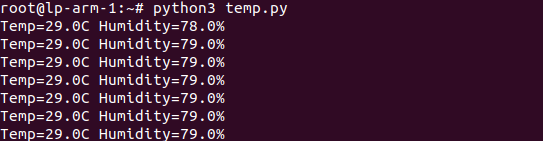
For DHT22 sensor:
temp-dht22.py
import Adafruit_DHT
import time

DHT_SENSOR = Adafruit_DHT.DHT22
DHT_PIN = 4

humidity, temperature = Adafruit_DHT.read(DHT_SENSOR, DHT_PIN)
if humidity is not None and temperature is not None:
    #print("Temp={0:0.1f}C Humidity={1:0.1f}%".format(temperature, humidity))
    print("{0},{1}".format(temperature, humidity))
- shell script to send over pushgateway
root@lp-arm-1:~# cat /opt/cron/get_temp_dht22.sh
#!/bin/bash

t_and_h=$(python3 /opt/cron/get_temp_dht22.py)

temprerature=$(echo $t_and_h | awk -F ',' '{print $1}')
humidity=$(echo $t_and_h | awk -F ',' '{print $2}')
echo "room_temp $temprerature" | curl --data-binary @- http://192.168.0.183:30008/metrics/job/room_temp/instance/lp-arm-1
echo "room_humidity $humidity" | curl --data-binary @- http://192.168.0.183:30008/metrics/job/room_humidity/instance/lp-arm-1
Mount single file in docker
We can use –mount type=bind parameter to mount single file
docker run -d -p 9090:9090 --mount type=bind,source=/opt/prometheus/prometheus.yml,target=/etc/prometheus/prometheus.yml prom/prometheus:v2.22.0Using docker-compose file
version: "3.7"
services:
  prometheus:
    image: prom/prometheus:v2.22.0
    volumes:
      - type: bind
        source: /opt/prometheus/prometheus.yml
        target: /etc/prometheus/prometheus.yml
    ports:
      - 9090:9090
More : https://stackoverflow.com/questions/42248198/how-to-mount-a-single-file-in-a-volume
raspberry pi fan on/off automation based on cpu temp
Note : This does not work because IO pins does not enough power to run fan.
fan.py
import RPi.GPIO as GPIO
from time import sleep
import sys

GPIO.setwarnings(False)
GPIO.setmode(GPIO.BOARD)
GPIO.setup(8, GPIO.OUT, initial=GPIO.LOW)

if sys.argv[1] == "on":
 GPIO.output(8, GPIO.HIGH)
 print("on")
else:
 GPIO.output(8, GPIO.LOW)
 print("off")
Dockerfile
FROM python:slim-buster
WORKDIR /fan
RUN apt update && \
    apt install python-rpi.gpio python3-rpi.gpio -y
COPY fan.py .
Docker build
docker build -t fan .Docker run command switch on
docker run -it --device /dev/gpiomem fan python2 fan.py onDocker run command switch off
docker run -it --device /dev/gpiomem fan python2 fan.py offfan.sh
#!/bin/bash

cpu=$(</sys/class/thermal/thermal_zone0/temp)

cpu_temp=$(echo "$cpu/1000" | /usr/bin/bc)
echo $cpu_temp

if(("cpu_temp" >= "65"))
then
echo "more 65 on fan"
docker run -it --device /dev/gpiomem fan python2 fan.py on
else
echo "less 65 off fan"
docker run -it --device /dev/gpiomem fan python2 fan.py off
fi
More: https://raspberrypihq.com/making-a-led-blink-using-the-raspberry-pi-and-python/
https://stackoverflow.com/questions/48441737/docker-error-no-access-to-dev-mem-try-running-as-root
Greylog setup with filebeat and Raw/Plaintext TCP
More : https://docs.graylog.org/en/4.0/pages/installation/docker.html
version: '2'
services:
  mongodb:
    image: mongo:4.2
  elasticsearch:
    image: docker.elastic.co/elasticsearch/elasticsearch-oss:7.10.2
    environment:
      - http.host=0.0.0.0
      - transport.host=localhost
      - network.host=0.0.0.0
      - "ES_JAVA_OPTS=-Xms512m -Xmx512m"
    ulimits:
      memlock:
        soft: -1
        hard: -1
    mem_limit: 1g
  graylog:
    image: graylog/graylog:4.0
    environment:
      - GRAYLOG_PASSWORD_SECRET=somepasswordpepper
      - GRAYLOG_ROOT_PASSWORD_SHA2=8c6976e5b5410415bde908bd4dee15dfb167a9c873fc4bb8a81f6f2ab448a918
      - GRAYLOG_HTTP_EXTERNAL_URI=http://192.168.0.228:9000/
    entrypoint: /usr/bin/tini -- wait-for-it elasticsearch:9200 --  /docker-entrypoint.sh
    links:
      - mongodb:mongo
      - elasticsearch
    restart: always
    depends_on:
      - mongodb
      - elasticsearch
    ports:
      # Graylog web interface and REST API
      - 9000:9000
      # Syslog TCP
      - 1514:1514
      # Syslog UDP
      - 1514:1514/udp
      # GELF TCP
      - 12201:12201
      # GELF UDP
      - 12201:12201/udp
      - 5555:5555
      - 5551:5551
Note : 5555 port will be used for filebeat as logstash output
System / inputs >> select input > Beats > launch input > global tick > titile > port = 5555 > threads =2 > Save

- Install filebeat : https://www.elastic.co/guide/en/beats/filebeat/current/filebeat-installation-configuration.html
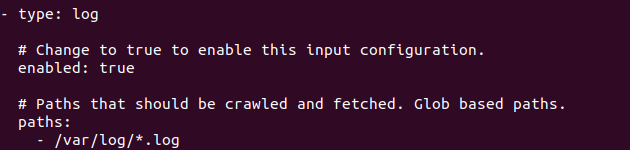
- Edit
/etc/filebeat/filebeat.yml

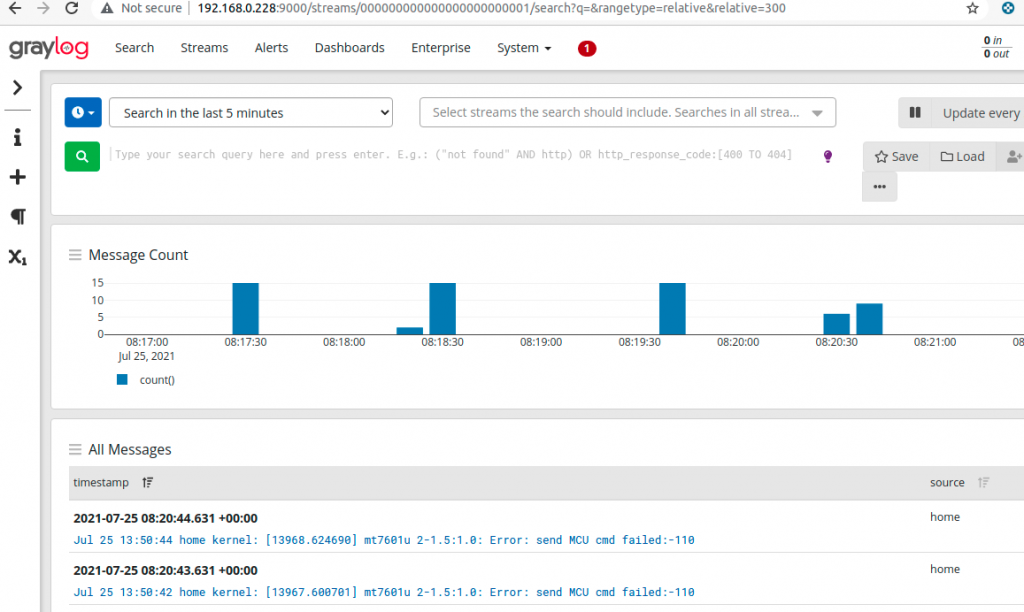
Output:
Raw/Plaintext TCP
System / inputs >> select input > Raw/Plaintext TCP > launch input > global tick > titile > port = 5551 > threads =2 > Save
for sending Raw/Plaintext TCP
echo "this is log" > /dev/tcp/grelog_server/5551how to start learn docker and kubernetes
- Linux – installation of different distro with lvm, encrypted lvm, plain
- Shell scripting – auto restart job , sed , awk
- Docker – jenkins setup, wordpress setup with persistent volume
- kubernetes – cluster setup, deployment