- Check if ffmpegthumbnailer is installed
ffmpegthumbnailer -h
sudo apt update
sudo apt install ffmpegthumbnailer- Then clear the thumbnail cache
rm -rf ~/.cache/thumbnails/*- Restart files
nautilus -qffmpegthumbnailer -h
sudo apt update
sudo apt install ffmpegthumbnailerrm -rf ~/.cache/thumbnails/*nautilus -qKeep Proxmox running normally
Turn off only the laptop screen/backlight
Prevent suspend/sleep on lid close
nano /etc/systemd/logind.conf

#add

HandleLidSwitch=ignore

HandleLidSwitchDocked=ignore
HandleSuspendKey=ignore
HandleHibernateKey=ignore

systemctl restart systemd-logindapt update
apt install vbetool
vbetool dpms off
vbetool dpms onsystemctl status bluetooth.service
● bluetooth.service - Bluetooth service
Loaded: loaded (/usr/lib/systemd/system/bluetooth.service; enabled; preset: enabled)
Active: active (running) since Fri 2025-03-21 07:57:38 IST; 1min 18s ago
Docs: man:bluetoothd(8)
Main PID: 21633 (bluetoothd)
Status: "Running"
Tasks: 1 (limit: 76673)
Memory: 1.1M (peak: 1.6M)
CPU: 55ms
CGroup: /system.slice/bluetooth.service
└─21633 /usr/libexec/bluetooth/bluetoothd
#!/bin/bash

if [[ $(hcitool con | grep '00:1B:66:0F:XX:XX' | wc -l) != 1 ]]
then
    echo "connect 00:1B:66:0F:XX:XX" | bluetoothctl

else
    echo "Already connected to 00:1B:66:0F:XX:XX"
firoot@home:~# bluetoothctl
bluetooth]# [NEW] Device F4:C8:8A:7F:xx:xx CP250003
[bluetooth]# hci0 type 7 discovering off
[bluetooth]# hci0 type 7 discovering on
[bluetooth]# hci0 type 7 discovering off
[bluetooth]# hci0 type 7 discovering on
[bluetooth]# [DEL] Device F4:C8:8A:7F:xx:xx CP250003
[bluetooth]# [NEW] Device F4:C8:8A:7F:xx:xx CP250003
[bluetooth]# hci0 type 7 discovering off
[bluetooth]# hci0 type 7 discovering on
[bluetooth]# [CHG] Device D0:49:7C:8F:xx:xx RSSI: 0xffffffab (-85)
list List available controllers
show [ctrl] Controller information
select <ctrl> Select default controller
devices [Paired/Bonded/Trusted/Connected] List available devices, with an optional property as the filter
system-alias <name> Set controller alias
reset-alias Reset controller alias
power <on/off> Set controller power
pairable <on/off> Set controller pairable mode
discoverable <on/off> Set controller discoverable mode
discoverable-timeout [value] Set discoverable timeout
agent <on/off/auto/capability> Enable/disable agent with given capability
default-agent Set agent as the default one
advertise <on/off/type> Enable/disable advertising with given type
set-alias <alias> Set device alias
scan <on/off/bredr/le> Scan for devices
info [dev/set] Device/Set information
pair [dev] Pair with device
cancel-pairing [dev] Cancel pairing with device
trust [dev] Trust device
untrust [dev] Untrust device
block [dev] Block device
unblock [dev] Unblock device
remove <dev> Remove device
connect <dev> Connect device
disconnect [dev] Disconnect device
menu <name> Select submenu
version Display version
quit Quit program
exit Quit program
help Display help about this program
export Print environment variables
[root@lp-knode-1 ~]# date
Tue Mar  4 19:32:46 IST 2025

[root@lp-knode-1 ~]# timedatectl
               Local time: Tue 2025-03-04 19:33:01 IST
           Universal time: Tue 2025-03-04 14:03:01 UTC
                 RTC time: Tue 2025-03-04 14:27:56
                Time zone: Asia/Kolkata (IST, +0530)
System clock synchronized: no
              NTP service: inactive
          RTC in local TZ: no


[root@lp-knode-1 ~]# timedatectl set-ntp on
[root@lp-knode-1 ~]# timedatectl status
               Local time: Tue 2025-03-04 20:00:13 IST
           Universal time: Tue 2025-03-04 14:30:13 UTC
                 RTC time: Tue 2025-03-04 14:30:13
                Time zone: Asia/Kolkata (IST, +0530)
System clock synchronized: yes
              NTP service: active
          RTC in local TZ: no

[root@lp-knode-1 ~]# date
Tue Mar  4 20:00:17 IST 2025
@home:~/Downloads$ zip-password-finder -i mahuli6.zip --minPasswordLen=6 --maxPasswordLen=6 --fileNumber=1 -c=d -w=12
Targeting file 'mahuli/mahuli-bg.jpg' within the archive
Archive encrypted with AES256 - expect a long wait time
Starting 12 workers to test passwords
Generating passwords with length from 6 to 6 for charset with length 10
0123456789
Starting search space for password length 6 (1000000 possibilities)
Time elapsed: 2m 51s 256ms 948us 212ns
Password found:666666

unshadow /etc/passwd  /etc/shadow > pass.txt
user@home:~$ john pass.txt
user@home:~$ john pass.txt --show
abc1:11111111:1000:1000:abc1:/home/abc1:/bin/bash
abc2:22222222:1002:1002:,,,:/home/abc2:/bin/bash


user@home:~$ ls .john/
john.log  john.pot
Note: Don’t use simple password.
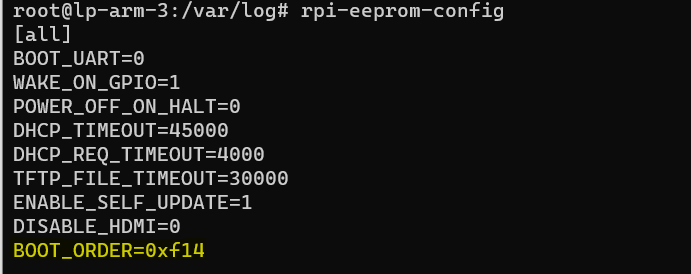
rpi-eeprom-config -e| Value | Mode | Description |
|---|---|---|
| 0x0 | SD CARD DETECT | Try SD then wait for card-detect to indicate that the card has changed – deprecated now that 0xf (RESTART) is available. |
| 0x1 | SD CARD | SD card (or eMMC on Compute Module 4). |
| 0x2 | NETWORK | Network boot – See Network boot server tutorial |
| 0x3 | RPIBOOT | RPIBOOT – See usbboot |
| 0x4 | USB-MSD | USB mass storage boot – See USB mass storage boot |
| 0x5 | BCM-USB-MSD | USB 2.0 boot from USB Type C socket (CM4: USB type A socket on CM4IO board). Not available on Raspberry Pi 5. |
| 0x6 | NVME | CM4 and Pi 5 only: boot from an NVMe SSD connected to the PCIe interface. See NVMe boot for more details. |
| 0x7 | HTTP | HTTP boot over ethernet. See HTTP boot for more details. |
| 0xe | STOP | Stop and display error pattern. A power cycle is required to exit this state. |
| 0xf | RESTART | Restart from the first boot-mode in the BOOT_ORDER field i.e. loop |
boot order: https://www.raspberrypi.com/documentation/computers/raspberry-pi.html#BOOT_ORDER
wsl --update[automount]
options = "metadata"
[boot]
systemd=true wsl --shutdownapt install nginx -y
systemctl status nginx
#OR you can install docker directly in WSLwsl -l
wsl -l -vls /proccat /proc/<process_id>/cmdlinecat /proc/<process_id>/fd/1
cat /proc/<process_id>/fd/2