- Get process id
ps -ef | grep process_name- Go to process root direcotry
#stdout
tail -f /proc/<process_id>/fd/1

#stderror
tail -f /proc/<process_id>/fd/2ps -ef | grep process_name#stdout
tail -f /proc/<process_id>/fd/1
#stderror
tail -f /proc/<process_id>/fd/2
[home@home Downloads]$ time rsync -parvP ubuntu-20.04.4-live-server-amd64.iso root@192.168.0.183:/tmp
sending incremental file list
ubuntu-20.04.4-live-server-amd64.iso
    646,053,888  48%   11.15MB/s    0:01:00  ^C
rsync error: unexplained error (code 255) at rsync.c(703) [sender=3.2.3]

real	0m56.958s
user	0m6.159s
sys	0m2.564s


[home@home Downloads]$ time rsync -parvP ubuntu-20.04.4-live-server-amd64.iso root@192.168.0.183:/tmp
sending incremental file list
ubuntu-20.04.4-live-server-amd64.iso
  1,331,691,520 100%   20.02MB/s    0:01:03 (xfr#1, to-chk=0/1)

sent 658,982,006 bytes  received 178,830 bytes  9,765,345.72 bytes/sec
total size is 1,331,691,520  speedup is 2.02

real	1m6.846s
user	0m27.066s
sys	0m1.862s
[home@home Downloads]$ time rsync -parv ubuntu-20.04.4-live-server-amd64.iso root@192.168.0.183:/tmp
sending incremental file list
ubuntu-20.04.4-live-server-amd64.iso
sent 1,332,016,766 bytes received 35 bytes 11,633,334.51 bytes/sec
total size is 1,331,691,520 speedup is 1.00
real 1m54.871s
user 0m6.400s
sys 0m3.748scommand mode:
u5uinsert mode:
:u:undoCTRL + R:redolshw -class memorydmidecode -t memorydnf install decode-dimms
decode-dimmsStrip command strips the symbols form object file.
strip /path/to/binaryfile

strip -s /path/to/binaryfile

# on strip debug symbols

strip --strip-debug example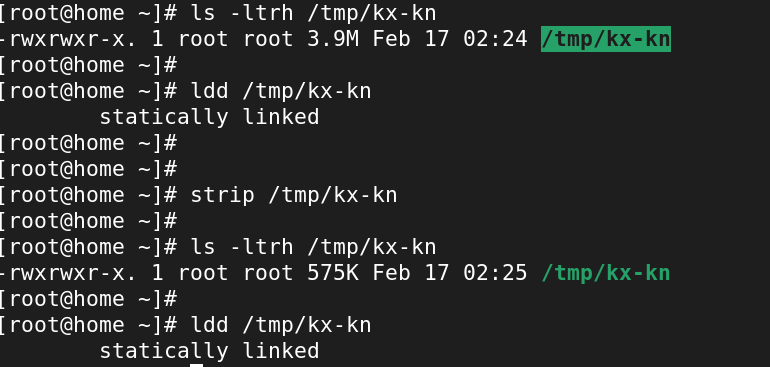
To view all symbols in binary(readelf)
readelf -s /path/to/binaryfilenm command:
nm /path/to/binaryfileMore
We can use screen, tmux, nohup command to run process in background.
But, what we can do if we already run the process and we want to send it to background.
We can use kill signal to achieve this.
kill -SIGSTOP PID
kill -SIGCONT PID
SIGSTOP = pause the process
SIGCONT = continue the process
Here is example.
sleep-loop.sh
while(true)
do
echo "running loop...$(date +%s)"
sleep 5
done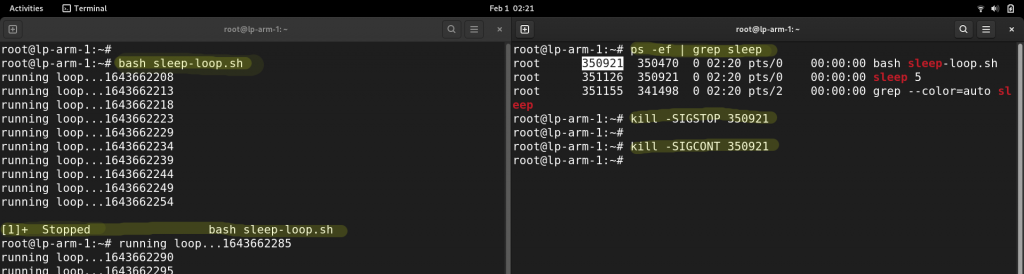
You can close the 1st terminal after starting in running the SIGCONT in another terminal AND you can also close the 2nd second terminal as well as it’s running in backgroud.(kind of nohup)
disown %1disow will remove form job queue and run in background so that we can close the terminal
More – https://stackoverflow.com/questions/625409/how-do-i-put-an-already-running-process-under-nohup
xargs pass the output(stdout) of first command to second command as argument.
ls | xargs rm -f This will remove all file listed by ls command
-p flag. It’s like dry-run.[root@lp-k8control-1 xargs]# ls
test test2 test3
[root@lp-k8control-1 xargs]# ls | xargs -p rm -f
rm -f test test2 test3 ?...

flag -n1 = one at a time
[root@lp-k8control-1 xargs]# ls | xargs -p -n1 rm -f
rm -f test ?...
flag -I % = run multiple command
[root@lp-k8control-1 xargs]# ls | xargs -p -n1 -I % /bin/bash -c 'ls %; ll %  '
/bin/bash -c ls test; ll test   ?...y
test

One of the issue that i face with my raspberry pi 4 SD card. I removed it when it was in the pi case. Which broke the SD card chip in half internally.
Lesson : Always remove the SD carefully.
broke my 32 GB SD card while removing from Pi. I tried formatting with fdisk, mkfs.ext4 and Windows but none of them worked.
I have attached screenshot of fdisk /dev/sda where I have created 1 partition but when i try to delete the same it’s giving error No partition is defined yet!

Here is the lsblk output:
root@lp-arm-1:~# lsblk
NAME        MAJ:MIN RM  SIZE RO TYPE MOUNTPOINT
loop0         7:0    0 88.1M  1 loop /snap/core/11803
loop1         7:1    0 48.9M  1 loop /snap/core18/2127
loop2         7:2    0   49M  1 loop /snap/core18/2248
loop3         7:3    0 57.4M  1 loop /snap/core20/1171
loop4         7:4    0 88.1M  1 loop /snap/core/11996
loop5         7:5    0 60.4M  1 loop /snap/lxd/21544
loop6         7:6    0 28.2M  1 loop /snap/snapd/13269
loop7         7:7    0 57.4M  1 loop /snap/core20/1084
loop8         7:8    0   62M  1 loop /snap/lxd/21032
loop9         7:9    0 28.2M  1 loop /snap/snapd/13643
sda           8:0    1 30.6M  0 disk
mmcblk0     179:0    0 59.7G  0 disk
├─mmcblk0p1 179:1    0  256M  0 part /boot/firmware
└─mmcblk0p2 179:2    0 59.4G  0 part /
Note: mmcblk0 is another working SD card
When try to format it with widows OS.

ad_join.sh
#!/bin/bash

#check if already joined to domain

if [[ $(realm list) != "" ]]
then
echo "This server is already joined to domain."
realm list | head -n 1
exit
fi

function update_sssd_config() {
    sed -i 's/use_fully_qualified_names = True/use_fully_qualified_names = False/g' /etc/sssd/sssd.conf
    sed -i 's|/home/%u@%d|/home/%u|g' /etc/sssd/sssd.conf
    systemctl restart sssd
}

function restrict_ssh_access_group() {
    if [[ $(cat /etc/ssh/sshd_config | grep -o "updated_by_ad_join") != "updated_by_ad_join" ]]
    then
    echo "###############updated_by_ad_join.sh###############" >> /etc/ssh/sshd_config
    echo "AllowGroups root ssh-access-group" >> /etc/ssh/sshd_config
    systemctl restart sshd
    fi
}

function sudo_access_level_group() {
    if [[ $(cat /etc/sudoers | grep -o "updated_by_ad_join") != "updated_by_ad_join" ]]
    then
    echo "###############updated_by_ad_join.sh###############" >> /etc/sudoers
    echo "Cmnd_Alias SUDO_ACCESS_LEVEL1 = /usr/bin/ls, /usr/bin/cat " >> /etc/sudoers
    echo "Cmnd_Alias SUDO_ACCESS_LEVEL2 = /usr/bin/vi, /usr/bin/nano " >> /etc/sudoers

    echo "%sudo-group-level1 ALL=(ALL) NOPASSWD: SUDO_ACCESS_LEVEL1"  >> /etc/sudoers
    echo "%sudo-group-level2 ALL=(ALL) NOPASSWD: SUDO_ACCESS_LEVEL2"  >> /etc/sudoers
    echo "%sudo-group-full-access ALL=(ALL) NOPASSWD: ALL"  >> /etc/sudoers
    fi
}

#check os
if [[ $(cat /etc/os-release | egrep "centos|redhat|fedora|rhel|oracle|rocky") != "" ]]
then
yum install sssd realmd oddjob oddjob-mkhomedir adcli samba-common samba-common-tools krb5-workstation openldap-clients  -y
realm join -vvv --user=administrator ad.example.com

#call function
update_sssd_config

restrict_ssh_access_group

sudo_access_level_group

fi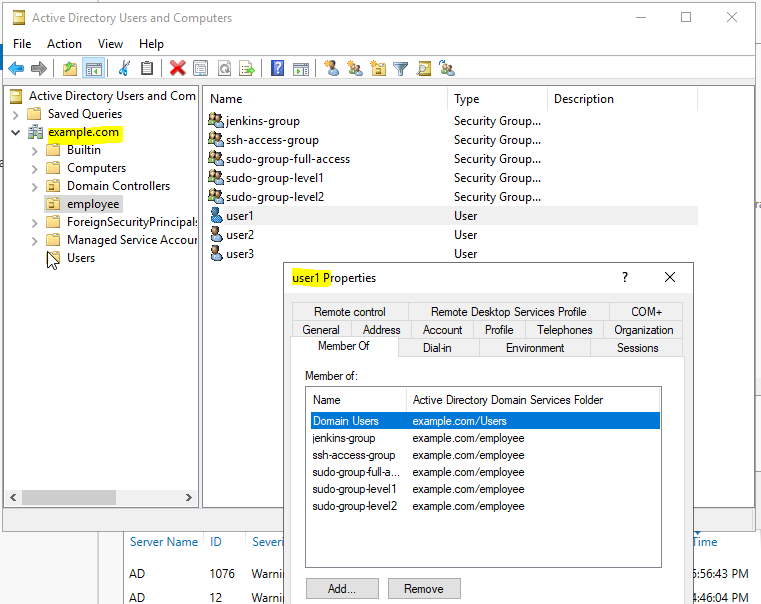

Useful when we need to add cron entry using shell script
cron.sh
crontab -l > /tmp/cron.bak
echo "* * * * * /opt/backup.sh" >> /tmp/cron.bak
crontab /tmp/cron.bak
