Use the kernel PPS path. Do not write a Python or C GPIO polling loop for timing. User-space timing will add scheduling latency; the kernel PPS driver timestamps the edge much earlier and exposes it as /dev/pps0.
Wiring:
ESP32 GPIO27(PPS) ----------------->  Pi 5 GPIO18 / phy pin 12
ESP32 GND         ----------------->  Pi 5 GND    / phy pin 14
Time Source Design
PPS alone is not a complete clock. It tells the Pi exactly where the second boundary is, but not which UTC second it is.
Chrony therefore needs:
- PPS on
/dev/pps0for the precise second edge. - A normal time source, such as the ESP32 GNSS NTP server, for UTC date and second numbering.
Flow:
M10S GNSS
   |
   | GNSS time + PPS
   v
ESP32
   |
   | GPIO27 PPS
   v
Raspberry Pi 5 GPIO18
   |
   | kernel PPS timestamp
   v
/dev/pps0
   |
   v
chronyd
   |
   +-- PPS: precise second boundary
   +-- ESP32 NTP: UTC second/date
   |
   v
Pi 5 serves LAN NTP as stratum 1
Enable PPS on Raspberry Pi 5
Edit the Pi boot config:
sudo nano /boot/firmware/config.txt
Add this line:
dtoverlay=pps-rp1,pin=18,pull-down,schmitt-trigger
Why this overlay:
pps-rp1is the Pi 5/RP1-specific PPS overlay.pin=18selects GPIO18, physical pin 12.pull-down=keeps the input from floating when PPS is disconnected.schmitt-triggercan help clean up marginal/noisy edges on a wire.
Do not add assert-falling-edge for the normal GNSS PPS case. The default is rising-edge assert, which is what you usually want from a GNSS 1PPS output.
Reboot:
After reboot, check that the PPS device exists:
ls -l /dev/pps*Install Chrony and PPS Tools:
apt update
apt install chrony pps-tools
Test the PPS input before configuring Chrony:
ppstest /dev/pps0
Expected output should increment once per second:
root@lp-arm-5:~# ppstest /dev/pps0
trying PPS source "/dev/pps0"
found PPS source "/dev/pps0"
ok, found 1 source(s), now start fetching data...
source 0 - assert 1788624719.999999432, sequence: 5376 - clear  0.000000000, sequence: 0
source 0 - assert 1788624721.000000259, sequence: 5377 - clear  0.000000000, sequence: 0
source 0 - assert 1788624721.999999836, sequence: 5378 - clear  0.000000000, sequence: 0
Configure Chrony
Assume the ESP32 GNSS NTP server is reachable at:
192.168.10.90Edit Chrony config:
sudo nano /etc/chrony/chrony.conf
Use this minimal configuration as the core of the file. Adjust the server IP and allow network for your LAN.
# Coarse UTC source.
# This gives chronyd the actual UTC second/date.
server 192.168.10.90 iburst minpoll 3 maxpoll 3 prefer

# Precise PPS source.
# ESP32 GPIO27 -> Pi 5 GPIO18 -> kernel PPS -> /dev/pps0.
refclock PPS /dev/pps0 refid PPS poll 0 prefer

# Clock discipline.
makestep 0.1 3
rtcsync

# Allow LAN clients to query this Pi as an NTP server.
# Change this to match your network.
allow 192.168.0.0/16

# Optional logging.
log tracking measurements statistics
logdir /var/log/chrony
Restart Chrony:
sudo systemctl restart chronyVerify SynchronizationP
chronyc sources -vHealthy output eventually looks like this:
root@lp-arm-5:~# chronyc sources -v
MS Name/IP address         Stratum Poll Reach LastRx Last sample
===============================================================================
#* PPS                           0   0   377     1   -133ns[ -155ns] +/-   18ns
^- 192.168.10.90                 1   3   377     7  -2363us[-2362us] +/- 5521us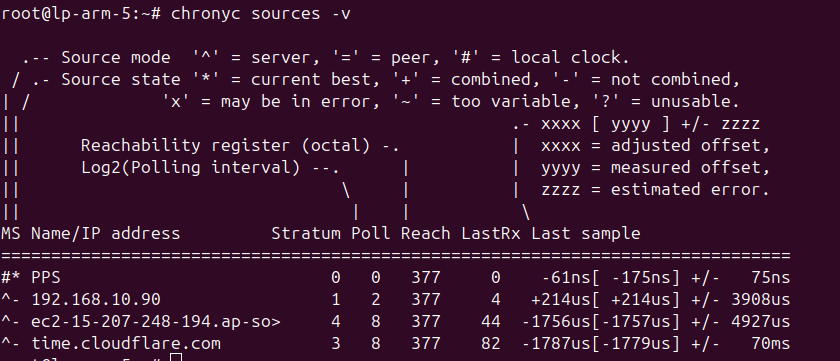
- 2 Local PPS compare
refclock PPS /dev/pps0 refid PPS0 poll 0
refclock PPS /dev/pps1 refid PPS1 poll 0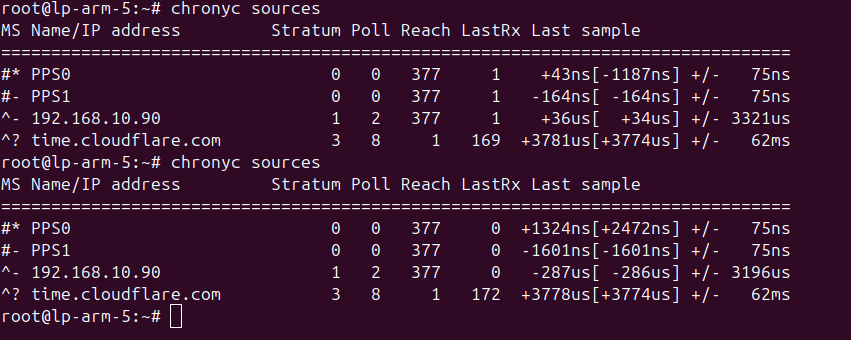
Verify NTP Serving from Another Machine:
From another Linux machine on the LAN:
ntpdate -q <PI5_IP>
Example:
ntpdate -q 192.168.0.183
Why There Is No Custom Timing Code?
The fast and low-jitter path is:
ESP32 PPS
   |
   v
Pi 5 RP1 GPIO interrupt
   |
   v
Linux PPS kernel timestamp
   |
   v
/dev/pps0
   |
   v
chronyd
A custom C or Python program would run after the kernel schedules it, which adds avoidable latency and jitter. For a stratum-1 NTP server, use the kernel PPS driver plus Chrony.
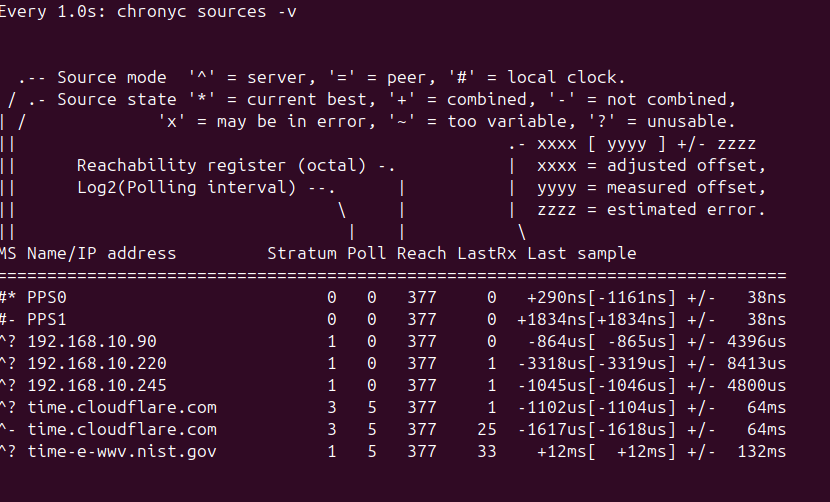
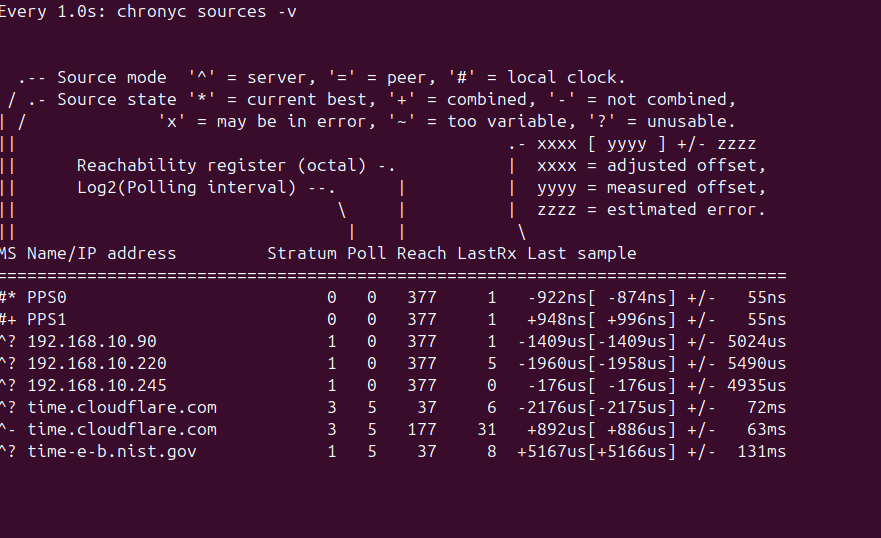
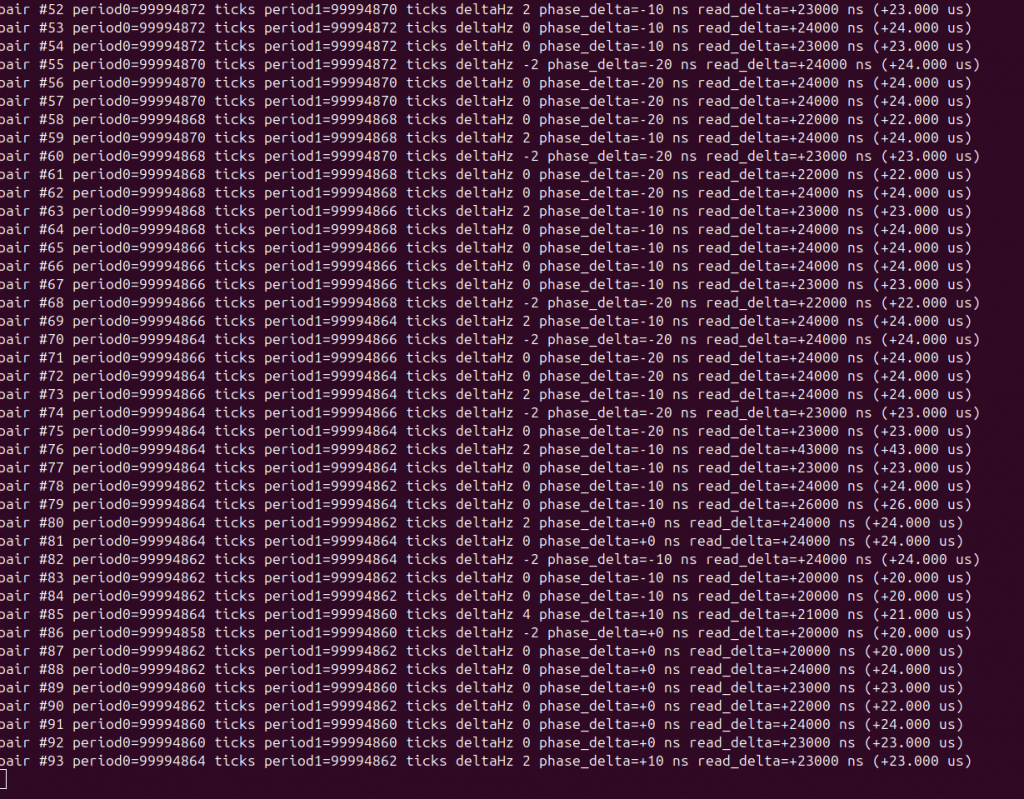
- Some screenshot of comparing PPS and nano sec in chrony
References
- Raspberry Pi firmware overlay documentation:
pps-rp1supports Pi 5/RP1 PPS on a selectable GPIO pin, including pull resistors, Schmitt trigger, clear capture, and falling-edge options: https://raw.githubusercontent.com/raspberrypi/firmware/master/boot/overlays/README - Linux kernel PPS documentation: https://docs.kernel.org/driver-api/pps.html
- Chrony configuration documentation: the
PPSrefclock uses the kernel PPS API and requires another time source to complete PPS samples: https://chrony-project.org/doc/latest/chrony.conf.html
