cat /sys/devices/virtual/dmi/id/board_asset_tag

#short hostname
hname=$(cat /sys/devices/virtual/dmi/id/board_asset_tag | awk '{print substr($0,5,15)}')
hostnamectl set-hostname $hname
Author: Alok
DevSecOps
Rabbitmq docker-compose
version: '3'
services:
  rabbitmq:
    image: rabbitmq:3-management
    restart: always
    container_name: rabbitmq
    environment:
      TZ: "Asia/Kolkata"
      RABBITMQ_DEFAULT_USER: username
      RABBITMQ_DEFAULT_PASS: password
    volumes:
      - /opt/rabbitmq/data:/var/lib/rabbitmq
    ports:
      - 5671:5671
      - 5672:5672
      - 15672:15672
Docker command :
dodocker run -d -p 5671:5671 -p 5672:5672 -p 15672:15672 -v /opt/rabbitmq/data:/var/lib/rabbitmq -e RABBITMQ_DEFAULT_USER=user -e RABBITMQ_DEFAULT_PASS=password -e TZ="Asia/Kolkata" --restart unless-stopped rabbitmq:3-managementcloudcustodian ec2 start/stop rule
start-policy.yml
policies:
  - name: start-policy
    resource: aws.ec2
    query:
      - instance-state-name: stopped
    filters:
      - "tag:owner": present
    actions:
      - start
stop-policy.yml
policies:
  - name: stop-policy
    resource: aws.ec2
    filters:
      - "tag:owner": present
    actions:
      - stop
custodian run --cache-period 0 start-policy.yml -s output
custodian run --cache-period 0 stop-policy.yml -s output
https://cloudcustodian.io/docs/aws/gettingstarted.html
Deregister aws ami older than 30 days:
policies:
  - name: ebs-delete-old-ebs-snapshots
    resource: ami
    filters:
        - type: image-age
          days: 30
          op: ge
    actions:
        - deregister
Delete aws snapshot older than 30 days:
policies:
  - name: ebs-delete-old-ebs-snapshots
    resource: ebs-snapshot
    filters:
        - type: age
          days: 30
          op: ge
    actions:
        - delete
Docker CloudCustodian
docker run -it -v $(pwd)/output:/opt/custodian/output -v $(pwd):/opt/custodian/ --env-file <(env | grep "^AWS\|^AZURE\|^GOOGLE|^kubeconfig") cloudcustodian/c7n run -v -s /opt/custodian/output /opt/custodian/policy.yml
docker run -it --entrypoint=/bin/bash -v $(pwd)/output:/opt/custodian/output -v $(pwd):/opt/custodian/ --env-file <(env | grep "^AWS\|^AZURE\|^GOOGLE|^kubeconfig") cloudcustodian/c7nMysql allow from all – Test
CREATE USER 'root'@'%' IDENTIFIED BY 'Test#123';

GRANT ALL PRIVILEGES ON *.* TO 'root'@'%' WITH GRANT OPTION;capture TLS/HTTPS traffic via tcpdump
only TLS traffic
tcpdump -ni eth0 "(tcp[((tcp[12] & 0xf0) >> 2)] = 0x16)"
TLS traffic with port
tcpdump -ni eth0 "tcp port 443 and (tcp[((tcp[12] & 0xf0) >> 2)] = 0x16)"
TLS traffic with host ip
tcpdump -ni eth0 "tcp host 10.10.10.10 and (tcp[((tcp[12] & 0xf0) >> 2)] = 0x16)"
Capture packets for wireshark
tcpdump -vvvv -A -i weave '((dst port 80) and (net 10.36.0.15))' -w app2.cap


sudo tcpdump -vvvv -A -i etho -w app2.cap
More : https://stackoverflow.com/questions/39624745/capture-only-ssl-handshake-with-tcpdump
https://www.wireshark.org/docs/wsug_html_chunked/AppToolstcpdump.html
Openport using NC:
nc -l 8888Listen port:
nc -l localhost 8888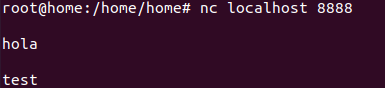
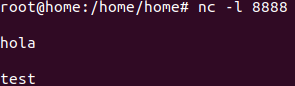
Send packet using bash:
echo -n "hello" >/dev/tcp/localhost/8888Access sidecar/multi-container pod with kubectl
Get container names in pod:
kubectl describe pod1kubectl exec pod_name1 -c container_name1 -- bash
kubectl exec pod_name1 -c container_name2 -- bash
kunbectl exec --helpmore : https://www.mirantis.com/blog/multi-container-pods-and-container-communication-in-kubernetes/
Jenkins questions list
- install jenkins using docker-compose
- default port for jenkins 8080
- Explain the your CICD pipeline
- What is DSL?
- How do you manage credentials in jenkins?
- explain the basic structure of Jenkinsfile?
- how jobs are managed for different branch/ multibranch?
- What issues you faced in jenkins? = plugin high disk IO
- build trigger?
- how to configure webhook?
- poll SCM?
- light checkout in jekins?
- groovy sandbox?
- add worker node in jenkins? types of method?
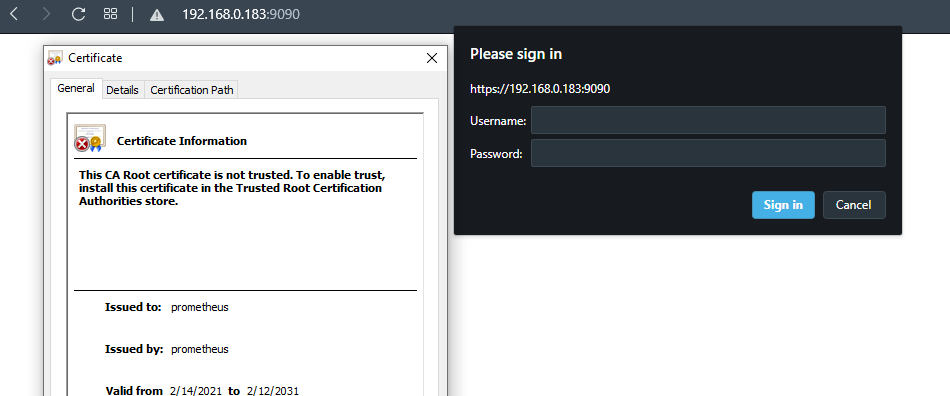
Promethus inbuilt basic authentication and TLS
github : https://github.com/prometheus/prometheus/pull/8316
from v2.24.0 basic authentication and TLS is inbuilt into prometheus.
webconfig.yml
tls_server_config:
  cert_file: /etc/prometheus/prometheus.cert
  key_file: /etc/prometheus/prometheus.key

basic_auth_users:
admin: $2y$12$/B1Z0Ohq/g9z/BlD30mi/uRDNdBRs/VrtAZrJDtY73Ttjc8RYHJ2O- Start prometheus with webconfig file
./prometheus --web.config.file=webconfig.yml- Prometheus will be accessible on https and with basic auth (admin/admin)
- Password should be bcrypt encrypted – https://bcrypt-generator.com
Disk IO read/write monitor
yum install sysstat -y

iostat -t

iostat -xtc

iostat -d
#More command

iostat -dx /dev/sda 5
sar
vmstat
badblockDocker private registry server
echo '{
 "insecure-registries" : [ "192.168.0.183:5000" ]
}' > /etc/docker/daemon.json
docker run -d -p 5000:5000 --restart=always --name registry registry:2
registry-docker-compose.yml
version: '3'
services:
  registry:
    image: registry:2
    user: root:root
    restart: always
    container_name: registry
    environment:
      TZ: "Asia/Kolkata"
    volumes:
      - /mnt/registry:/var/lib/registry
    ports:
      - 5000:5000