pipeline
{
    agent { label  'master'}
    stages{

        stage('t1'){
            steps {
                timeout(time: 10, unit: 'SECONDS') {
                    sh 'sleep 5'
                    sh 'echo t1'
                }
                }
        }
        stage('t2'){
            steps {
                sh 'echo t2'
            }
        }
    }
}Author: Alok
DevSecOps
nohup alternative for windows in Jenkins
1.Run windows batch command in background using start
pipeline
{
    agent {
        label 'master'
    }
    stages{
		stage ('windows-nohup')
		{
			steps
			{

				bat """set JENKINS_NODE_COOKIE=dontKillMe && start /min COMMAND_TO_RUN """

			}
		}
    }
}
2.Run windows batch command in background with logs in jenkins workspace with batch and powershell
pipeline
{

    agent {
        label 'master'
    }

    stages{

    stage ('windows-nohup')
    {

        steps
        {
            //copy the command to test.bat file
            bat """echo COMMAND_TO_RUN REPLACE COMMAND.log > test.bat"""
			//replace the REPLACE with append symbol(>)
            powershell 'Get-Content test.bat | ForEach-Object { $_ -replace "REPLACE", " > " } | Set-Content test2.bat'
			//run the test2.bat in background
            bat 'set JENKINS_NODE_COOKIE=dontKillMe && start /min test2.bat ^& exit'
			//logs will be available at workspace COMMAND.log


			//Example
			/*
			bat """echo C:\\java8\\bin\\java -jar core.jar --config=test.json REPLACE java.log > test.bat"""
            powershell 'Get-Content test.bat | ForEach-Object { $_ -replace "REPLACE", " > " } | Set-Content test2.bat'
            bat 'more test2.bat'
            bat 'set JENKINS_NODE_COOKIE=dontKillMe && start /min test2.bat ^& exit'
			*/
        }
    }
    }
}Github webhook integration with Jenkins
1.Project > Configure > check github hook trigger and add repository URL
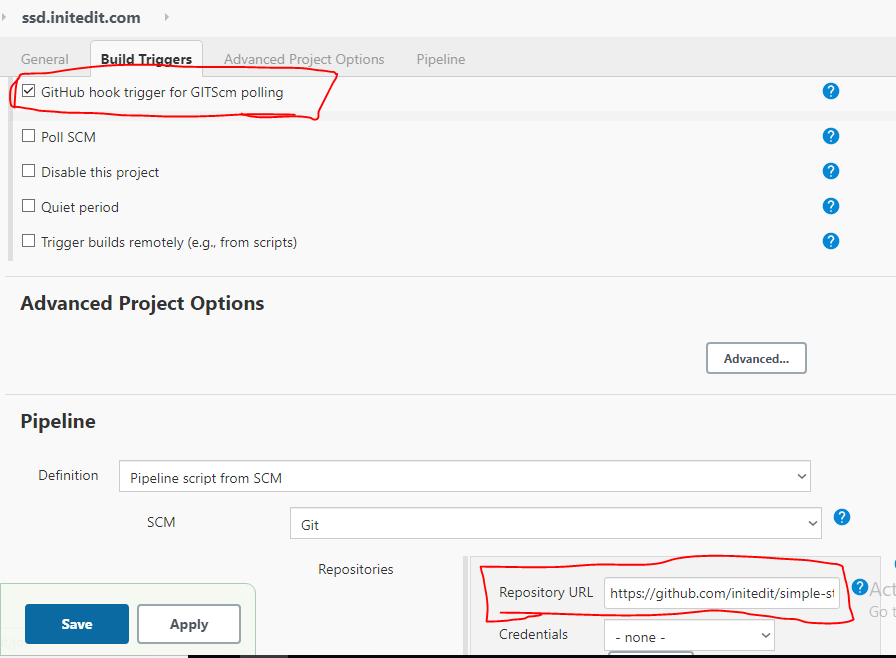
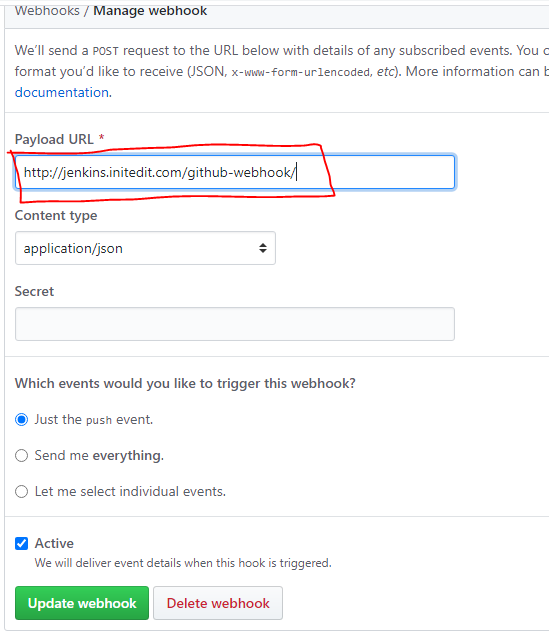
2.On Github Project > settings > Webhooks > Add webhook
Openfaas – serverless deployment with k8
1.Create serverless python3 deployment
faas-cli new --lang python3 python-fn --gateway http://192.168.0.183:31112 --prefix=192.168.0.183:30500/python-fn–prefix = Docker private repository
–gateway = Openfass gateway server
2.It will create the python-fn directory and python-fn.yml file
3.Write your python code inside python-fn/handler.py
def handle(req):
    """handle a request to the function
    Args:
        req (str): request body
    """
    print("hola-openfaas")
    return req
4.Build / Push / Deploy
faas-cli build -f python-fn.ymlfaas-cli push -f python-fn.ymlexport OPENFAAS_URL=http://192.168.0.183:31112
faas-cli login --password "YOUR_Openfaas_PASSWORD"faas-cli deploy -f python-fn.yml5. Remove
faas-cli remove -f python-fn.yml
rm -rf python-fn*
Openfaas installation in k8
curl -sL https://cli.openfaas.com | sudo sh

git clone https://github.com/openfaas/faas-netes

kubectl apply -f https://raw.githubusercontent.com/openfaas/faas-netes/master/namespaces.yml

PASSWORD=$(head -c 12 /dev/urandom | shasum| cut -d' ' -f1)

kubectl -n openfaas create secret generic basic-auth \
--from-literal=basic-auth-user=admin \
--from-literal=basic-auth-password="$PASSWORD"

cd faas-netes

kubectl apply -f ./yaml

nohup kubectl port-forward svc/gateway -n openfaas 31112:8080 &


export OPENFAAS_URL=http://192.168.0.183:31112

echo -n "$PASSWORD" | faas-cli login --password-stdin

echo "$PASSWORD"kubernetes Highly Available clusters Using 3 Master node
1. Setup TCP load balancer using nginx (192.168.0.50)
load_module /usr/lib64/nginx/modules/ngx_stream_module.so;
events { }

stream {

upstream kapi {
	server 192.168.0.51:6443;
	server 192.168.0.52:6443;
	server 192.168.0.53:6443;
}

server {
	listen 8888;
	proxy_pass kapi;
    }

}
2. Run below command on all master node
yum install -y kubelet kubeadm kubectl docker
systemctl enable kubelet
systemctl start kubelet
systemctl enable docker
systemctl start docker
3. Run below command on 192.168.0.51
kubeadm init --control-plane-endpoint "192.168.0.50:8888" --upload-certsIt will generate command to add other master node and worker node
4.Join other 2 master (192.168.0.51, 192.168.0.52)
 kubeadm join 192.168.0.50:8888 --token hvlnv8.6r90i8d04cs23sii \
    --discovery-token-ca-cert-hash sha256:bc6fe39f98c7ae6cd8434bd8ade4eb3b15b45e151af37595e4be0a9fdfcfdcc4 \
    --control-plane --certificate-key 3659353b0a256650fb0c1a0357cb608d07e3bdc8ce8b64fa995bcb814c131fa6
Note : Token will be differ
5.Get the info of cluster
kubectl cluster-info

kubectl get nodeSkip stages in Jenkins
stages {
def skip_stage = 'skip'
pipeline
{
agent {
    label 'master'
}
parameters {
string(name: 'skip_stage', description: 'skip stage', defaultValue: 'skip')
}
  stages
{
  stage("test") {
     when {
        expression { skip_stage != "skip" }
     }
     steps {
        echo 'This will never run'
     }
  }
}
}
More when condition : https://gist.github.com/merikan/228cdb1893fca91f0663bab7b095757c
Prometheus and Grafana on Kubernetes with nfs persistent volume
Prometheus-k8.yml
apiVersion: apps/v1
kind: Deployment
metadata:
  name: prometheus-deployment
  labels:
    app: prometheus
    env: prod
spec:
  replicas: 1
  selector:
    matchLabels:
      app: prometheus
      env: prod
  template:
    metadata:
      labels:
        app: prometheus
        env: prod
    spec:
      containers:
      - name: prometheus-container
        image: prom/prometheus
        imagePullPolicy: IfNotPresent
        resources:
          requests:
            memory: "128Mi"
            cpu: "200m"
          limits:
            memory: "256Mi"
            cpu: "200m"
        volumeMounts:
          - name: config-volume
            mountPath: /etc/prometheus/prometheus.yml
            subPath: prometheus.yml
          - name: prometheus-storage-volume
            mountPath: /prometheus
        ports:
        - containerPort: 9090
      volumes:
        - name: config-volume
          configMap:
           name: prometheus-conf
        - name: prometheus-storage-volume
          nfs:
            server: 192.168.0.184
            path: "/opt/nfs1/prometheus"
---
kind: Service
apiVersion: v1
metadata:
  name: prometheus-service
  labels:
    app: prometheus
    env: prod
spec:
  selector:
    app: prometheus
    env: prod
  ports:
  - name: promui
    protocol: TCP
    port: 9090
    targetPort: 9090
    nodePort: 30090
  type: NodePort
Create prometheus.yml config-map file
kubectl create configmap game-config --from-file=/mnt/nfs1/prometheus/prometheus.ymlprometheus.yml
    global:
      scrape_interval:     30s
      evaluation_interval: 30s

    scrape_configs:
      - job_name: 'lp-kmaster-01'
        static_configs:
        - targets: ['192.168.0.183:9100']
Grafana-k8.yml
apiVersion: apps/v1
kind: Deployment
metadata:
  name: grafana-deployment
  labels:
    app: grafana
    env: prod
spec:
  replicas: 1
  selector:
    matchLabels:
      app: grafana
  template:
    metadata:
      name: grafana-deployment
      labels:
        app: grafana
        env: prod
    spec:
      containers:
      - name: grafana
        image: grafana/grafana:7.0.0
        imagePullPolicy: IfNotPresent
        resources:
          requests:
            memory: "128Mi"
            cpu: "200m"
          limits:
            memory: "256Mi"
            cpu: "200m"
        ports:
        - name: grafana
          containerPort: 3000
        volumeMounts:
          - mountPath: /var/lib/grafana
            name: grafana-storage
      volumes:
        - name: grafana-storage
          nfs:
            server: 192.168.0.184
            path: "/opt/nfs1/grafana"

---
apiVersion: v1
kind: Service
metadata:
  name: grafana-service
  labels:
    app: grafana
    env: prod
spec:
  selector:
    app: grafana
  type: NodePort
  ports:
    - port: 3000
      targetPort: 3000
      nodePort: 30091
HAproxy configuration on docker
1.Install docker
yum install docker

systemctl enable docker
systemctl start docker
2. Run haproxy docker images with with persistent volume
mkdir /opt/haproxy

#and move the haproxy.cfg  inside /opt/haproxy

docker run -d -p 8888:8888 -p 8404:8404 -v /opt/haproxy:/usr/local/etc/haproxy:Z haproxy
3. haproxy.cfg
global
	daemon
	maxconn 256

defaults
    timeout connect 10s
    timeout client 30s
    timeout server 30s
    log global
    mode http
    option httplog
    maxconn 3000

frontend stats
	bind *:8404
	stats enable
	stats uri /stats
	stats refresh 10s

frontend app1
	bind *:80
	default_backend app1_backend

backend app1_backend
	server server1 192.168.0.151:8080 maxconn 32
	server server1 192.168.0.152:8080 maxconn 32
	server server1 192.168.0.153:8080 maxconn 32
docker-compose file
version: '3'
services:
  haproxy:
    image: haproxy
    ports:
     - 80:80
     - 8404:8404
    volumes:
- /opt/haproxy:/usr/local/etc/haproxySetup elasticsearch cluster with 3 nodes
1. Up the /etc/hosts on all 3 nodes
192.168.0.50 elk1.local
192.168.0.51 elk2.local
192.168.0.52 elk3.local
Note : Minimum 2 nodes should be up to make cluster healthy.
2.Install elasticsearch on all 3 nodes
rpm --import https://artifacts.elastic.co/GPG-KEY-elasticsearch

echo '[elasticsearch-7.x]
name=Elasticsearch repository for 7.x packages
baseurl=https://artifacts.elastic.co/packages/7.x/yum
gpgcheck=1
gpgkey=https://artifacts.elastic.co/GPG-KEY-elasticsearch
enabled=1
autorefresh=1
type=rpm-md' > /etc/yum.repos.d/elasticsearch.repo

###install elasticsearch
yum -y install elasticsearch

###Enable elasticsearch
systemctl enable elasticsearch
3. Edit /etc/elasticsearch/elasticsearch.yml as per cluster name (eg. elk-cluster)
cluster.name: elk-cluster
node.name: elk1.local
path.data: /var/lib/elasticsearch
path.logs: /var/log/elasticsearch
network.host: 192.168.0.50
discovery.seed_hosts: ["elk1.local", "elk2.local", "elk3.local"]
cluster.initial_master_nodes: ["elk1.local", "elk2.local", "elk3.local"]
change the only node.name and network.host for other 2 elasticsearch nodes
4. Restart elasticsearch service on all 3 elasticsearch node
systemctl restart elasticsearchAfter restart 1 master node will be elected.
5. Check master node in elasticsearch cluster
curl -X GET "192.168.0.50:9200/_cat/master?v&pretty"More : https://www.elastic.co/guide/en/elasticsearch/reference/current/cat-master.html
More information about setting up cluster : https://www.elastic.co/guide/en/elasticsearch/reference/current/modules-discovery.html
Pi-hole on kubernetes with NFS persistent volume
1.Create NFS share
2. pi-hole-deployment.yml
---
apiVersion: apps/v1
kind: Deployment
metadata:
  name: pi-hole-deployment
spec:
  replicas: 1
  selector:
    matchLabels:
      app: pi-hole
  template:
    metadata:
      name: pi-hole-deployment
      labels:
        app: pi-hole
        env: prod
    spec:
      containers:
      - name: pi-hole
        image: pihole/pihole
        imagePullPolicy: IfNotPresent
        resources:
          requests:
            memory: "256Mi"
            cpu: "200m"
          limits:
            memory: "512Mi"
            cpu: "200m"
        volumeMounts:
          - name: pihole-nfs
            mountPath: /etc/pihole
          - name: dnsmasq-nfs
            mountPath: /etc/dnsmasq.d
        ports:
        - name: tcp-port
          containerPort: 53
          protocol: TCP
        - name: udp-port
          containerPort: 53
          protocol: UDP
        - name: http-port
          containerPort: 80
        - name: https-port
          containerPort: 443
      volumes:
        - name: pihole-nfs
          nfs:
            server: 192.168.0.184
            path: "/opt/nfs1/pihole/pihole"
        - name: dnsmasq-nfs
          nfs:
            server: 192.168.0.184
            path: "/opt/nfs1/pihole/dnsmasq.d"


---
apiVersion: v1
kind: Service
metadata:
  name: pi-hole-service
  labels:
    app: pi-hole
    env: prod
spec:
  selector:
    app: pi-hole
  type: NodePort
  externalIPs:
    - 192.168.0.183
  ports:
  - name: dns-tcp
    port: 53
    targetPort: 53
    nodePort: 30053
    protocol: TCP
  - name: dns-udp
    port: 53
    targetPort: 53
    nodePort: 30053
    protocol: UDP
  - name: http
    port: 800
    targetPort: 80
    nodePort: 30054
  - name: https
    port: 801
    targetPort: 443
    nodePort: 30055
Note: Use externalIPs in service so that the IP can be put inside wifi DNS.