In Place Pod VerticalScaling in k8

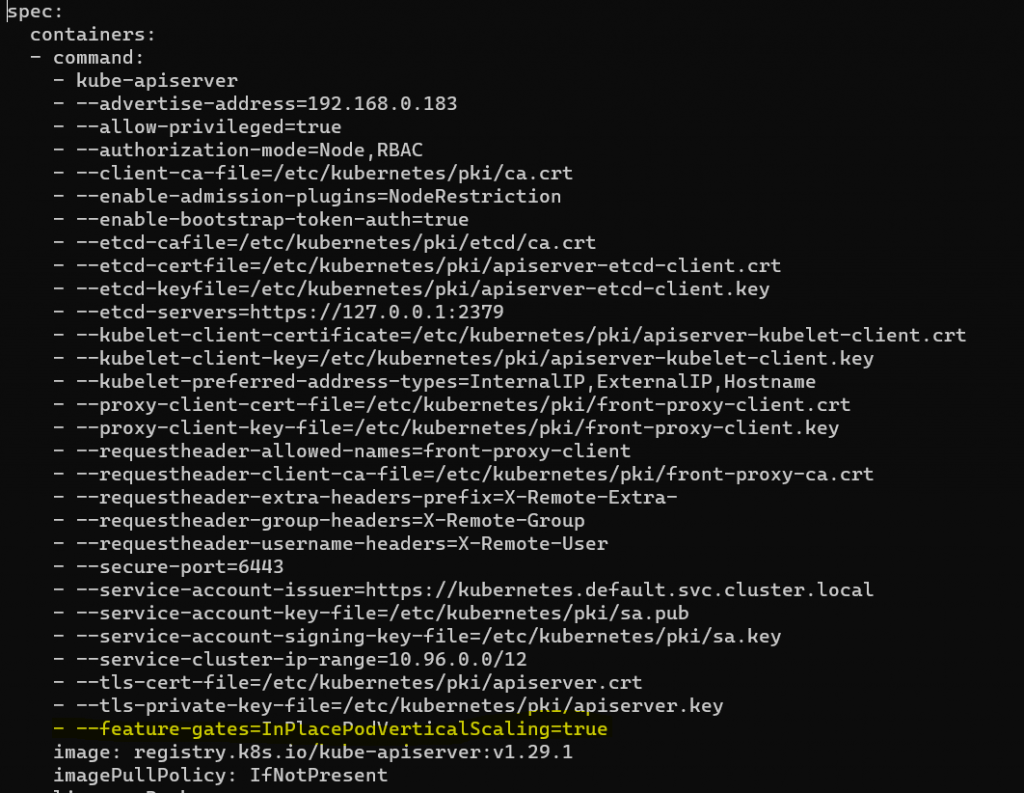
  • Enable feature gate InPlacePodVerticalScaling

/etc/kubernetes/manifests/kube-apiserver.yaml
nginx.yml

apiVersion: apps/v1
kind: Deployment
metadata:
  creationTimestamp: null
  labels:
    app: nginx
  name: nginx
spec:
  replicas: 1
  selector:
    matchLabels:
      app: nginx
  strategy: {}
  template:
    metadata:
      creationTimestamp: null
      labels:
        app: nginx
    spec:
      containers:
      - image: nginx
        name: nginx
        resizePolicy:
        - resourceName: cpu
          restartPolicy: NotRequired
        - resourceName: memory
          restartPolicy: NotRequired
        resources:
          limits:
            memory: "100Mi"
            cpu: "100m"
          requests:
            memory: "100Mi"
            cpu: "100m"

patch.yml [only applied to pod]

kubectl patch pod nginx-94675f6cf-9bxzj --patch '{"spec":{"containers":[{"name":"nginx", "resources":{"requests":{"cpu":"200m"}, "limits":{"cpu":"200m"}}}]}}'
boot order – Raspbery pi

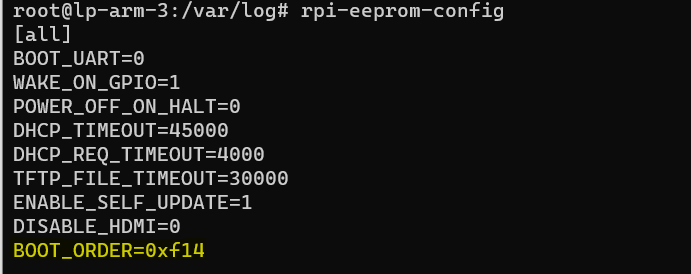
  • Edit boot order(read from right to left)
1. 4 = Read from USB
2. 1 = Read from SD Card
3. 0xf = Restart boot order

rpi-eeprom-config -e
ValueModeDescription
0x0SD CARD DETECTTry SD then wait for card-detect to indicate that the card has changed – deprecated now that 0xf (RESTART) is available.
0x1SD CARDSD card (or eMMC on Compute Module 4).
0x2NETWORKNetwork boot – See Network boot server tutorial
0x3RPIBOOTRPIBOOT – See usbboot
0x4USB-MSDUSB mass storage boot – See USB mass storage boot
0x5BCM-USB-MSDUSB 2.0 boot from USB Type C socket (CM4: USB type A socket on CM4IO board). Not available on Raspberry Pi 5.
0x6NVMECM4 and Pi 5 only: boot from an NVMe SSD connected to the PCIe interface. See NVMe boot for more details.
0x7HTTPHTTP boot over ethernet. See HTTP boot for more details.
0xeSTOPStop and display error pattern. A power cycle is required to exit this state.
0xfRESTARTRestart from the first boot-mode in the BOOT_ORDER field i.e. loop

boot order: https://www.raspberrypi.com/documentation/computers/raspberry-pi.html#BOOT_ORDER

Rabbitmq shovel – sync/move queue message

  • Export the queue definition and Import into destination rabbitmq
  • Enable Shovel plugin by running these command inside container
rabbitmq-plugins enable rabbitmq_shovel
rabbitmq-plugins enable rabbitmq_shovel_management
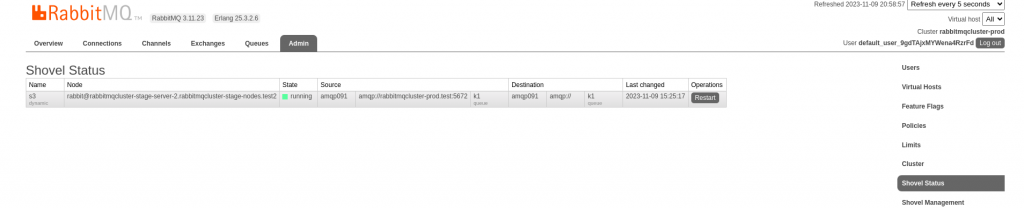
  • Admin > Shovel Management
  • Source : amqp://user:password@rabbitmqcluster-prod.test:5672

Note: Source should not include / at the end.

  • Destination: amqp://
  • queue: k1

Error:

2023-11-09 15:24:08.911950+00:00 [error] <0.7052.0>                {child_type,worker}]
2023-11-09 15:24:08.928523+00:00 [error] <0.7502.0> Shovel 's2' failed to connect (URI: amqp://rabbitmqcluster-prod.test/): access to target virtual host was refused
2023-11-09 15:24:08.928734+00:00 [error] <0.7502.0> Shovel 's2' has no more URIs to try for connection
2023-11-09 15:24:08.929101+00:00 [error] <0.7502.0> Shovel 's2' could not connect to source

References:

rancher desktop – libraries: libbz2.so.1.0: cannot open shared object

  • look for libbz2.so.1 file on your system
sudo find / -name libbz2.so.1
  • list the file to get the correct version
[root@fedora]# ls /usr/lib64/libbz2.so.1.0
libbz2.so.1.0    libbz2.so.1.0.8  
  • create symlink
ln -s /usr/lib64/libbz2.so.1.0.8 /usr/lib64/libbz2.so.1.0

Error on fedora:

libraries: libbz2.so.1.0: cannot open shared object file: No such file or directory\\n\”: exit status 127″\n’

Mithril sync cardano mainnet

  • Download the binary
wget https://github.com/input-output-hk/mithril/releases

tar -xzf mithril-x.tar.gz

chmod +x *
  • set env variable
export NETWORK=mainnet

export AGGREGATOR_ENDPOINT=https://aggregator.release-mainnet.api.mithril.network/aggregator

export GENESIS_VERIFICATION_KEY=5b3139312c36362c3134302c3138352c3133382c31312c3233372c3230372c3235302c3134342c32372c322c3138382c33302c31322c38312c3135352c3230342c31302c3137392c37352c32332c3133382c3139362c3231372c352c31342c32302c35372c37392c33392c3137365d

####preprod
export NETWORK=preprod

export AGGREGATOR_ENDPOINT=https://aggregator.release-preprod.api.mithril.network/aggregator

export GENESIS_VERIFICATION_KEY=5b3132372c37332c3132342c3136312c362c3133372c3133312c3231332c3230372c3131372c3139382c38352c3137362c3139392c3136322c3234312c36382c3132332c3131392c3134352c31332c3233322c3234332c34392c3232392c322c3234392c3230352c3230352c33392c3233352c34345d

#https://raw.githubusercontent.com/input-output-hk/mithril/main/mithril-infra/configuration/release-preprod/genesis.vkey

mithril-client cardano-db snapshot list


mithril-client snapshot download 87122ee3415112a1d2b215003e134652dd0ebf8f7588db8a0745336b9b249d4e

More : https://mithril.network/doc/manual/getting-started/bootstrap-cardano-node

PATH="$PATH:/root/cardano:/root/cardano/bin"
export CARDANO_NODE_SOCKET_PATH=/root/cardano/node-ipc/node.socket
services:
  cardano-node:
    image: ghcr.io/intersectmbo/cardano-node:10.2.1
    environment:
      - NETWORK=${NETWORK:-preprod}
    volumes:
      - /root/cardano/db:/data/db
      - /root/cardano/node-ipc:/ipc
    logging:
      driver: "json-file"
      options:
        max-size: "200k"
        max-file: "10"

  cardano-submit-api:
    image: ghcr.io/intersectmbo/cardano-submit-api:10.2.1
    environment:
      - NETWORK=${NETWORK:-preprod}
    depends_on:
      - cardano-node
    volumes:
      - /root/cardano/node-ipc:/node-ipc
    ports:
      - 8090:8090
    restart: on-failure
    logging:
      driver: "json-file"
      options:
        max-size: "200k"
        max-file: "10"