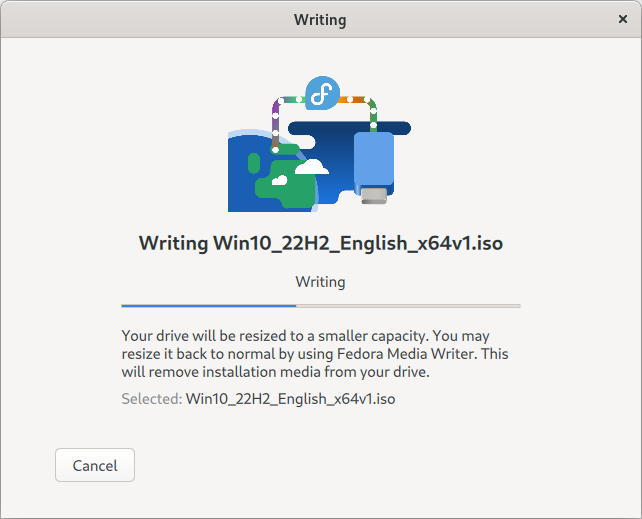
2. SUSE Studio Imagewriter
3.UNetbootin
4. Ventoy
import sys

arg = sys.argv[1]
arg_length = len(sys.argv[1])

print("arg_length: ",arg_length)

def palindrome(arg, arg_length):
    for i in range(0,int(arg_length/2)): # for checking half string
        if arg[i] != arg[arg_length-i-1]:
            return False
    return True

print(palindrome(arg, arg_length))
Output:
[home@fedora ~]$ python3 palidrom.py 11211
arg_length:  5
True
[home@fedora ~]$ python3 palidrom.py noon
arg_length:  4
True
[home@fedora ~]$ python3 palidrom.py qwerty
arg_length:  6
False####scale down####
namespaces="test,test2"
IFS=","
for namespace in $namespaces
do
deployments=$(kubectl get deploy -n $namespace | grep -v '0/0' | awk '{print $1}' | sed 1d | tr '\n' ' ')
IFS=" "
for deploy in $deployments
do
replicas="$(kubectl get deploy $deploy -o=custom-columns='REPLICAS:spec.replicas' -n $namespace | sed 1d | tr '\n' ' ')"
echo "namespace: $namespace deploy: $deploy replicas: $replicas"
kubectl label deploy $deploy weekdays-replicas=$replicas -n $namespace --overwrite=true
kubectl scale --replicas=0 statefulset $deploy -n "$namespace" || true
done
done####scale up####
namespaces="test,test2"
IFS=","
for namespace in $namespaces
do
deployments=$(kubectl get deploy -n $namespace | awk '{print $1}' | sed 1d | tr '\n' ' ')
IFS=" "
for deploy in $deployments
do
replicas="$(kubectl get deploy $deploy -o=custom-columns='REPLICAS:metadata.labels.weekdays-replicas' -n $namespace | sed 1d | tr '\n' ' ')"
echo "kubectl scale --replicas=$replicas statefulset $deploy -n "$namespace" || true"
done
doneError:
Mixed Content: The page at ” was loaded over HTTPS, but requested an insecure stylesheet ”. This request has been blocked; the content must be served over HTTPS.
version: '3.1'

services:
  wordpress:
    image: wordpress:6.2.0
    restart: always
    ports:
      - 8080:80
    volumes:
      - ./wordpress:/var/www/html

  db:
    image: mysql:5.7.39
    restart: always
    ports:
      - 3310:3306
    environment:
      MYSQL_ROOT_PASSWORD: root
    volumes:
      - ./mysql:/var/lib/mysql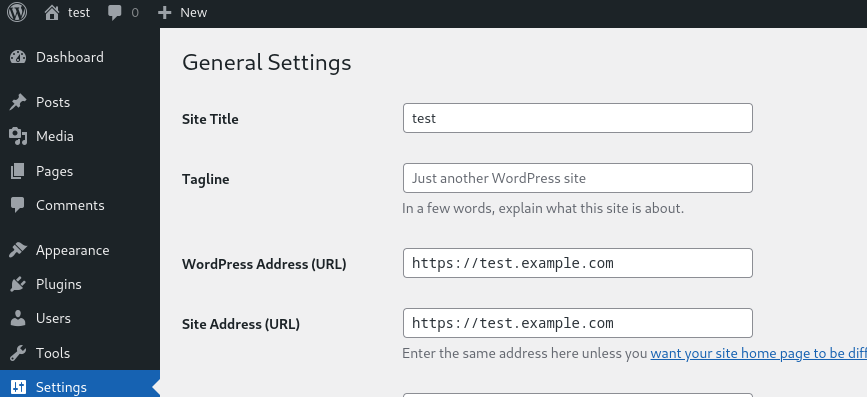
define('FORCE_SSL_ADMIN', true);
if ( isset( $_SERVER['HTTP_X_FORWARDED_PROTO'] ) && strpos( $_SERVER['HTTP_X_FORWARDED_PROTO'], 'https') !== false ) {
$_SERVER['HTTPS'] = 'on';
}
server {
    server_name test.example.com;
    location / {
        proxy_pass http://10.209.229.54:8080/;
        proxy_http_version 1.1;
        proxy_buffering off;
        proxy_read_timeout    90;
        proxy_connect_timeout 90;
        proxy_redirect        off;
        proxy_set_header Host $host;
        proxy_set_header Upgrade $http_upgrade;
        proxy_set_header X-Real-IP $remote_addr;
        proxy_set_header X-Forwarded-Proto https;
        proxy_set_header X-Forwarded-For $proxy_add_x_forwarded_for;
        proxy_set_header X-Forwarded-Port 443;
        proxy_set_header Proxy "";
    }

    listen 443 ssl;
    ssl_certificate /etc/nginx/ssl/cert.pem;
    ssl_certificate_key /etc/nginx/ssl/key.pem;

}

server {
    if ($host = test.example.com) {
        return 301 https://$host$request_uri;
    }
    server_name test.example.com;
    listen 80;
    return 404;
}
Reference:

Docker with TLS:
###### server
dockerd \
    --tlsverify \
    --tlscacert=ca.pem \
    --tlscert=server-cert.pem \
    --tlskey=server-key.pem \
    -H=0.0.0.0:2376

##### client
docker --tlsverify \
    --tlscacert=ca.pem \
    --tlscert=cert.pem \
    --tlskey=key.pem \
    -H=$HOST:2376 version

##### secure by default
mkdir -pv ~/.docker
cp -v {ca,cert,key}.pem ~/.docker
export DOCKER_HOST=tcp://$HOST:2376 DOCKER_TLS_VERIFY=1


##### make sure to have correct host/DNS name while creating the server certps -ef | grep etcd
cd /proc/2626577/fdls -ltr | grep db#create secret
kubectl create secret generic secret1 --from-literal=secretname=helloworld
#read secret directly from etcd
cat /var/lib/etcd/member/snap/db | strings | grep secret1 -C 10Encrypting Secret Data at Rest – https://kubernetes.io/docs/tasks/administer-cluster/encrypt-data/

   ┌─────────┐               port ┌────────┐
   │         │                    │        │
   │         │               2375 │        │
   │         ├────────────────────┤        │
   │         │           2376(TLS)│        │
   └─────────┘                    └────────┘
      client                      Docker Host

    192.168.0.10                  192.168.0.11
On docker client:
export DOCKER_HOST="tcp://192.168.0.11:2375"On docker host(192.168.0.114):
socat TCP-LISTEN:6644,reuseaddr,fork UNIX-CONNECT:/var/run/docker.sockOn docker client:
socat UNIX-LISTEN:/var/run/docker.sock,fork,reuseaddr,unlink-early,user=root,group=docker,mode=770 TCP:192.168.0.114:6644Docker client:
root@lp-arm-2:~# docker ps
CONTAINER ID   IMAGE         COMMAND                  CREATED          STATUS          PORTS           NAMES
18f7aff52a13 docker:dind "dockerd-entrypoint.…" 32 minutes ago Up 32 minutes 2375-2376/tcp nostalgic_janghttps://serverfault.com/questions/127794/forward-local-port-or-socket-file-to-remote-socket-file
aws ecs execute-command \
    --region eu-west-1 \
    --cluster default \
    --task arn:aws:ecs:eu-west-1:00123456789:task/default/9773f658cd134c3c934dd80b5227ae5f \
    --container nginx-poc \
    --interactive \
    --command "/bin/sh"

aws ecs describe-tasks --cluster default --tasks 9773f658cd134c3c934dd80b5227ae5f --region eu-west-1 | grep enableExecuteCommand

aws ecs update-service --service nginx-poc-svc2 --cluster default --region eu-west-1 \
  --enable-execute-command \
  --force-new-deployment
An error occurred (InvalidParameterException) when calling the UpdateService operation: The service couldn't be updated because a valid taskRoleArn is not being used. Specify a valid task role in your task definition and try again.{
"Version": "2012-10-17",
"Statement": [
{
"Effect": "Allow",
"Action": [
"ecs:ExecuteCommand",
"ssmmessages:CreateControlChannel",
"ssmmessages:CreateDataChannel",
"ssmmessages:OpenControlChannel",
"ssmmessages:OpenDataChannel"
],
"Resource": "*"
}
]
}