Getting GPS location using NEO-7M-0-000 Blox with ESP32

#include <WiFi.h>

const char *ssid = "wifi";
const char *password = "pass";

// GPS UART
HardwareSerial GPS(2); // UART2

// Standard NMEA TCP port
WiFiServer server(10110);

// Allow multiple clients
WiFiClient clients[5];

String line;

void setup() {
  Serial.begin(115200);

  // GPS on GPIO21 (RX), GPIO22 (TX)
  GPS.begin(9600, SERIAL_8N1, 21, 22);

  WiFi.mode(WIFI_STA);
  WiFi.begin(ssid, password);

  Serial.print("Connecting");

  while (WiFi.status() != WL_CONNECTED) {
    delay(500);
    Serial.print(".");
  }

  Serial.println();
  Serial.print("Connected: ");
  Serial.println(WiFi.localIP());

  server.begin();
  server.setNoDelay(true);

  Serial.println("NMEA TCP server started on port 10110");
}

void loop() {

  // Accept new clients
  if (server.hasClient()) {

    for (int i = 0; i < 5; i++) {

      if (!clients[i] || !clients[i].connected()) {

        if (clients[i])
          clients[i].stop();

        clients[i] = server.available();
        clients[i].setNoDelay(true);

        Serial.printf("Client %d connected\n", i);
        break;
      }
    }

    // No room
    WiFiClient reject = server.available();
    reject.stop();
  }

  // Read GPS
  while (GPS.available()) {

    char c = GPS.read();

    // Echo to USB serial
    Serial.write(c);

    line += c;

    if (c == '\n') {

      // Send complete NMEA sentence to all clients
      for (int i = 0; i < 5; i++) {

        if (clients[i] && clients[i].connected()) {

          clients[i].print(line);

          if (clients[i].getWriteError()) {
            clients[i].stop();
          }
        }
      }

      line.clear();

      // Prevent runaway if malformed data
      if (line.length() > 256)
        line.clear();
    }
  }
}
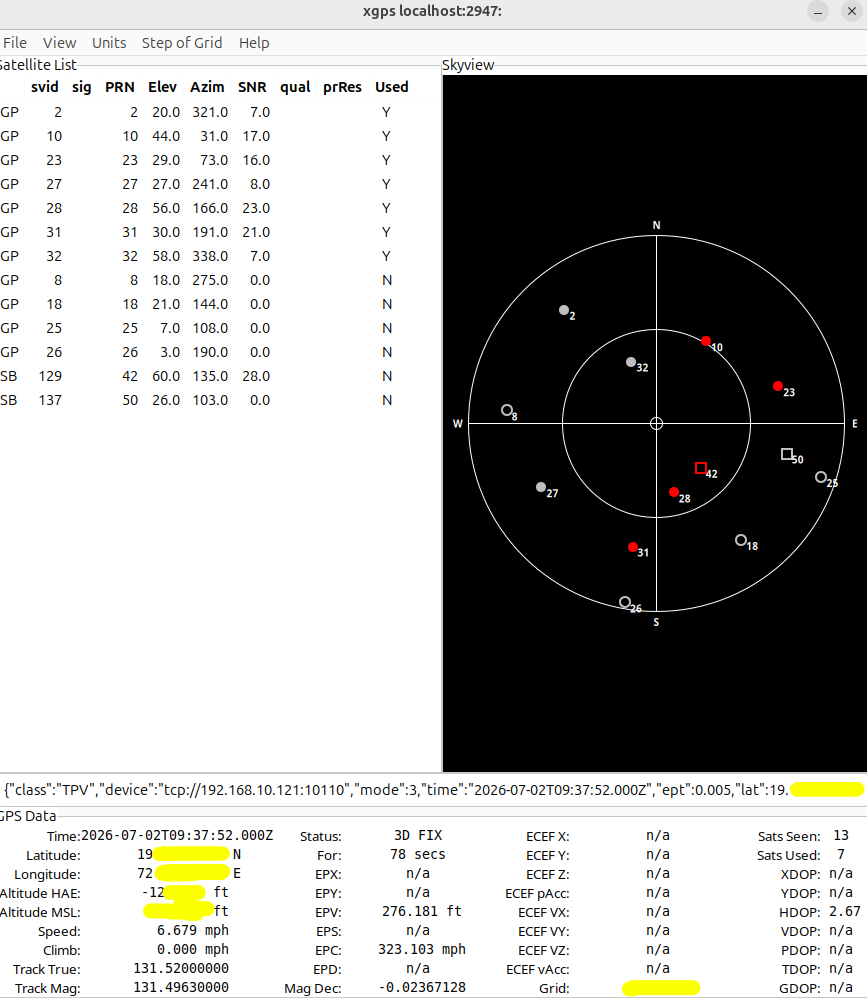
  • xgps to view data
apt install gpsd gpsd-clients
nc ESP-IP 10110
#OR
gpsd tcp://192.168.1.150:10110

#lauch

xgps
Screen shut off / light off / lid down

Keep Proxmox running normally
Turn off only the laptop screen/backlight
Prevent suspend/sleep on lid close

nano /etc/systemd/logind.conf

#add

HandleLidSwitch=ignore

HandleLidSwitchDocked=ignore
HandleSuspendKey=ignore
HandleHibernateKey=ignore

systemctl restart systemd-logind
  • Turn off the laptop display only
apt update
apt install vbetool
vbetool dpms off
vbetool dpms on

onedrive cli sync with logseq data dir

[Unit]
Description=OneDrive Sync Service for alok
After=network-online.target

[Service]
User=user1
ExecStart=/usr/bin/onedrive --monitor --single-directory 'logseq'
Restart=always
RestartSec=10

[Install]
WantedBy=multi-user.target

boot order – Raspbery pi

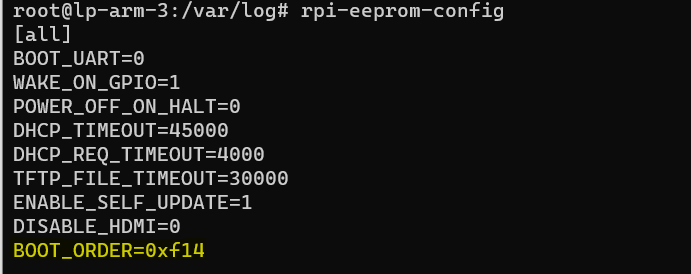
  • Edit boot order(read from right to left)
1. 4 = Read from USB
2. 1 = Read from SD Card
3. 0xf = Restart boot order

rpi-eeprom-config -e
ValueModeDescription
0x0SD CARD DETECTTry SD then wait for card-detect to indicate that the card has changed – deprecated now that 0xf (RESTART) is available.
0x1SD CARDSD card (or eMMC on Compute Module 4).
0x2NETWORKNetwork boot – See Network boot server tutorial
0x3RPIBOOTRPIBOOT – See usbboot
0x4USB-MSDUSB mass storage boot – See USB mass storage boot
0x5BCM-USB-MSDUSB 2.0 boot from USB Type C socket (CM4: USB type A socket on CM4IO board). Not available on Raspberry Pi 5.
0x6NVMECM4 and Pi 5 only: boot from an NVMe SSD connected to the PCIe interface. See NVMe boot for more details.
0x7HTTPHTTP boot over ethernet. See HTTP boot for more details.
0xeSTOPStop and display error pattern. A power cycle is required to exit this state.
0xfRESTARTRestart from the first boot-mode in the BOOT_ORDER field i.e. loop

boot order: https://www.raspberrypi.com/documentation/computers/raspberry-pi.html#BOOT_ORDER