On demand ecs fargate as Jenkins worker node

  • Create separate ecs-farget template for different kind of workload.
  • Do the proper tagging of resources so that we get proper costing

Docker with TLS:

###### server
dockerd \
    --tlsverify \
    --tlscacert=ca.pem \
    --tlscert=server-cert.pem \
    --tlskey=server-key.pem \
    -H=0.0.0.0:2376

##### client
docker --tlsverify \
    --tlscacert=ca.pem \
    --tlscert=cert.pem \
    --tlskey=key.pem \
    -H=$HOST:2376 version

##### secure by default
mkdir -pv ~/.docker
cp -v {ca,cert,key}.pem ~/.docker
export DOCKER_HOST=tcp://$HOST:2376 DOCKER_TLS_VERIFY=1


##### make sure to have correct host/DNS name while creating the server cert


Read the secrets data from etcd of kubernetes

  • Find out etcd procecss id
ps -ef | grep etcd
  • Go to process directory of ectd
cd /proc/2626577/fd
  • List the files and look for “/var/lib/etcd/member/snap/db
ls -ltr | grep db
  • To read any secret that is currently created by user in k8
#create secret

kubectl create secret generic secret1 --from-literal=secretname=helloworld

#read secret directly from etcd

cat /var/lib/etcd/member/snap/db | strings | grep secret1 -C 10

Encrypting Secret Data at Rest https://kubernetes.io/docs/tasks/administer-cluster/encrypt-data/

https://jonathan18186.medium.com/certified-kubernetes-security-specialist-cks-preparation-part-8-runtime-security-system-9f705872c17

CKS Practice questions 2023

  • Create runtimeclass named sandboxed with handler runsc and run new pod using runtime as sandboxed with image nginx.
  • Set min TLS version to VersionTLS12 and cipher to TLS_AES_128_GCM_SHA256 for Kubelet nad kubeapi server
  • etcd with –-cipher-suites=TLS_ECDHE_RSA_WITH_AES_128_GCM_SHA256
  • Node-authrization to minimize the cluster role and remove clusterrole and anonymous access.
  • ImagePolicyWebhook with default deny add correct app endpoint url in kubeconfig file
  • auditing with maxage=10, rotate=5
  • falco runtime format %evt,%user.name,%user.id,%proc.name
  • network policy default deny, pod with name and namespace selector
  • create service account bind with role/clusterrole binding and create a pod, delete unsed sa
  • create a secret and mount to pod with readonly
  • Create service account with automounttoken off
  • create a pod with /root/profile using apparmor. podname=xyz, image=nginx
  • analyse 2 issues in Dockerfile and Deployment file
  • scan image with trivy and delete critical severity pod
  • fix kube-bench report for kube-api , kubelet, kube-controler
  • Upgrade k8 cluster from 1.25.4 to 1.26.0

Docker socket remote access

Remote access docker:

   ┌─────────┐               port ┌────────┐
   │         │                    │        │
   │         │               2375 │        │
   │         ├────────────────────┤        │
   │         │           2376(TLS)│        │
   └─────────┘                    └────────┘
      client                      Docker Host

    192.168.0.10                  192.168.0.11

On docker client:

export DOCKER_HOST="tcp://192.168.0.11:2375"

With socat:

On docker host(192.168.0.114):

socat TCP-LISTEN:6644,reuseaddr,fork UNIX-CONNECT:/var/run/docker.sock

On docker client:

socat UNIX-LISTEN:/var/run/docker.sock,fork,reuseaddr,unlink-early,user=root,group=docker,mode=770 TCP:192.168.0.114:6644

Docker client:

root@lp-arm-2:~# docker ps
CONTAINER ID   IMAGE         COMMAND                  CREATED          STATUS          PORTS           NAMES
18f7aff52a13   docker:dind   "dockerd-entrypoint.…"   32 minutes ago   Up 32 minutes   2375-2376/tcp   nostalgic_jang

https://unix.stackexchange.com/questions/683688/is-it-possible-to-access-a-unix-socket-over-the-network

https://serverfault.com/questions/127794/forward-local-port-or-socket-file-to-remote-socket-file

get into aws ecs fargate container


aws ecs execute-command \
    --region eu-west-1 \
    --cluster default \
    --task arn:aws:ecs:eu-west-1:00123456789:task/default/9773f658cd134c3c934dd80b5227ae5f \
    --container nginx-poc \
    --interactive \
    --command "/bin/sh"
	
aws ecs describe-tasks --cluster default --tasks 9773f658cd134c3c934dd80b5227ae5f --region eu-west-1 | grep enableExecuteCommand

aws ecs update-service --service nginx-poc-svc2 --cluster default --region eu-west-1 \
  --enable-execute-command \
  --force-new-deployment
  
 
 An error occurred (InvalidParameterException) when calling the UpdateService operation: The service couldn't be updated because a valid taskRoleArn is not being used. Specify a valid task role in your task definition and try again.
  • add role ecsTaskExecutionRole
{
    "Version": "2012-10-17",
    "Statement": [
        {
            "Effect": "Allow",
            "Action": [
                "ecs:ExecuteCommand",
                "ssmmessages:CreateControlChannel",
                "ssmmessages:CreateDataChannel",
                "ssmmessages:OpenControlChannel",
                "ssmmessages:OpenDataChannel"
            ],
            "Resource": "*"
        }
    ]
}
  • AmazonECSTaskExecutionRolePolicy

Skopeo – Copy multi arch image from one registry to another registry

login to the repository:

[home@home ~]$ skopeo login --username $USER docker.io
Password: 
Login Succeeded!

Copy:

skopeo copy -a docker://nginx docker://$USER/nginx

References:

Get list of deploy with node selector kubernetes

#!/bin/bash

u_time=$(date +%s)

list_of_namespaces=$(kubectl get ns | awk '{print $1}' | sed 1d)
worker_node_list=$(kubectl get nodes --label-columns beta.kubernetes.io/instance-type --label-columns karpenter.sh/capacity-type -l role=worker | awk '{print $1}' | sed 1d)

for namespace in $list_of_namespaces
do
    echo "================$namespace=================="
    list_of_deploy=$(kubectl get deploy -n $namespace | awk '{print $1}' | sed 1d)

    for deploy in $list_of_deploy
    do
        if [ "$(kubectl get deploy $deploy -n $namespace -o yaml | grep nodeSelector -A 1 | grep role | awk '{print $NF}')" = "worker-arm64" ]
        then
            echo "$deploy,$namespace,true"
            echo "$deploy,$namespace,true" >> prod_deploy_arm64_$u_time.list
        else
            echo "$deploy,$namespace,false"
            echo "$deploy,$namespace,false" >> prod_deploy_arm64_$u_time.list
        fi
    done
done

encrypt files on linux system

Encyrtion tool:

UI:

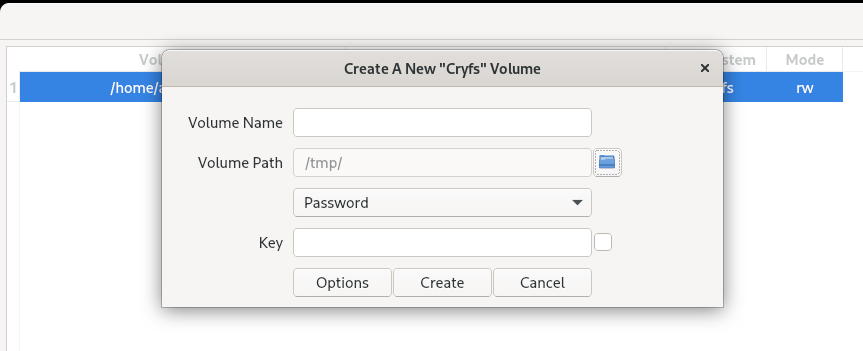
Create volume > cryfs > Vloume path(This is where excerpted data will be stored) > Volume name(eg. test-cryfs) > Password.Key > Create

df -hT 

#view mount directory. Copy your data to mount directory


[home@home ~]$ df -hT
Filesystem                                Type        Size  Used Avail Use% Mounted on
devtmpfs                                  devtmpfs     32G     0   32G   0% /dev
tmpfs                                     tmpfs        32G  345M   31G   2% /dev/shm
tmpfs                                     tmpfs        13G  2.1M   13G   1% /run
/dev/mapper/fedora_localhost--live-root00 ext4        184G  174G  1.8G  99% /
tmpfs                                     tmpfs        32G   32M   32G   1% /tmp
/dev/nvme0n1p2                            ext4        974M  210M  698M  24% /boot
/dev/nvme0n1p1                            vfat        599M   14M  585M   3% /boot/efi
tmpfs                                     tmpfs       6.3G  188K  6.3G   1% /run/user/1000
cryfs@/home/home/cryfs-test               fuse.cryfs  1.8G   32K  1.8G   1% /home/home/.SiriKali/cryfs-test

Options = Select algo for encryption

Onedrive client: https://github.com/abraunegg/onedrive/