get into aws ecs fargate container


aws ecs execute-command \
    --region eu-west-1 \
    --cluster default \
    --task arn:aws:ecs:eu-west-1:00123456789:task/default/9773f658cd134c3c934dd80b5227ae5f \
    --container nginx-poc \
    --interactive \
    --command "/bin/sh"
	
aws ecs describe-tasks --cluster default --tasks 9773f658cd134c3c934dd80b5227ae5f --region eu-west-1 | grep enableExecuteCommand

aws ecs update-service --service nginx-poc-svc2 --cluster default --region eu-west-1 \
  --enable-execute-command \
  --force-new-deployment
  
 
 An error occurred (InvalidParameterException) when calling the UpdateService operation: The service couldn't be updated because a valid taskRoleArn is not being used. Specify a valid task role in your task definition and try again.
  • add role ecsTaskExecutionRole
{
    "Version": "2012-10-17",
    "Statement": [
        {
            "Effect": "Allow",
            "Action": [
                "ecs:ExecuteCommand",
                "ssmmessages:CreateControlChannel",
                "ssmmessages:CreateDataChannel",
                "ssmmessages:OpenControlChannel",
                "ssmmessages:OpenDataChannel"
            ],
            "Resource": "*"
        }
    ]
}
  • AmazonECSTaskExecutionRolePolicy

Skopeo – Copy multi arch image from one registry to another registry

login to the repository:

[home@home ~]$ skopeo login --username $USER docker.io
Password: 
Login Succeeded!

Copy:

skopeo copy -a docker://nginx docker://$USER/nginx

References:

Get list of deploy with node selector kubernetes

#!/bin/bash

u_time=$(date +%s)

list_of_namespaces=$(kubectl get ns | awk '{print $1}' | sed 1d)
worker_node_list=$(kubectl get nodes --label-columns beta.kubernetes.io/instance-type --label-columns karpenter.sh/capacity-type -l role=worker | awk '{print $1}' | sed 1d)

for namespace in $list_of_namespaces
do
    echo "================$namespace=================="
    list_of_deploy=$(kubectl get deploy -n $namespace | awk '{print $1}' | sed 1d)

    for deploy in $list_of_deploy
    do
        if [ "$(kubectl get deploy $deploy -n $namespace -o yaml | grep nodeSelector -A 1 | grep role | awk '{print $NF}')" = "worker-arm64" ]
        then
            echo "$deploy,$namespace,true"
            echo "$deploy,$namespace,true" >> prod_deploy_arm64_$u_time.list
        else
            echo "$deploy,$namespace,false"
            echo "$deploy,$namespace,false" >> prod_deploy_arm64_$u_time.list
        fi
    done
done

encrypt files on linux system

Encyrtion tool:

UI:

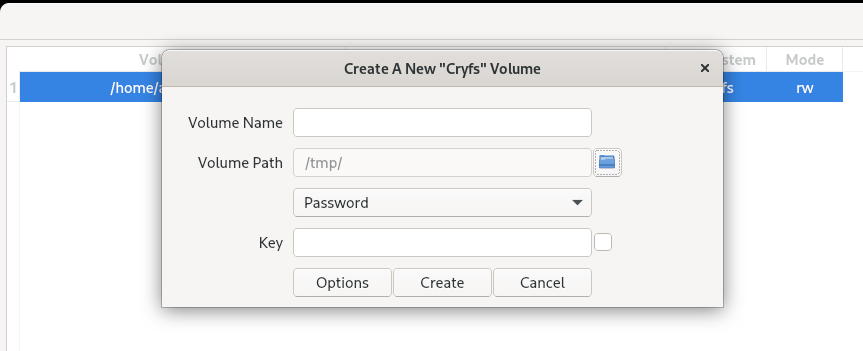
Create volume > cryfs > Vloume path(This is where excerpted data will be stored) > Volume name(eg. test-cryfs) > Password.Key > Create

df -hT 

#view mount directory. Copy your data to mount directory


[home@home ~]$ df -hT
Filesystem                                Type        Size  Used Avail Use% Mounted on
devtmpfs                                  devtmpfs     32G     0   32G   0% /dev
tmpfs                                     tmpfs        32G  345M   31G   2% /dev/shm
tmpfs                                     tmpfs        13G  2.1M   13G   1% /run
/dev/mapper/fedora_localhost--live-root00 ext4        184G  174G  1.8G  99% /
tmpfs                                     tmpfs        32G   32M   32G   1% /tmp
/dev/nvme0n1p2                            ext4        974M  210M  698M  24% /boot
/dev/nvme0n1p1                            vfat        599M   14M  585M   3% /boot/efi
tmpfs                                     tmpfs       6.3G  188K  6.3G   1% /run/user/1000
cryfs@/home/home/cryfs-test               fuse.cryfs  1.8G   32K  1.8G   1% /home/home/.SiriKali/cryfs-test

Options = Select algo for encryption

Onedrive client: https://github.com/abraunegg/onedrive/

Helm chart custom values

nginx-chart-files/
├── index.yaml
├── nginx-0.1.0.tgz
└── nginx-0.2.0.tgz

Generate manifest:

helm template ./direcotry  -f values.yaml --output-dir output_dir

helm template ./direcotry -f values.yml

#render in stdout

helm template ./direcotry  -f values.yaml --dry-run 
  • Create helm package (.gz file)
helm package ./direcotry_path
apiVersion: {{ template "controller.apiVersion" . }}
kind: {{ .Values.controller.kind }}
metadata:
  labels:
{{ $labels | indent 4 }}
  name: {{ $name }}
  namespace: {{ $.Release.Namespace }}
---
    spec:
    {{- with .Values.controller.hostAliases }}
      hostAliases:
{{ toYaml . | indent 8 }}
    {{- end }}
---

values.yml

controller:
  create: true
  kind: Deployment


---
  terminationGracePeriodSeconds: 30
  hostAliases:
  - hostnames:
    - example.com
    ip: 127.0.0.1

index.html

apiVersion: v1
entries:
  nginx:
  - apiVersion: v2
    appVersion: 1.16.0
    created: "2021-07-03T21:59:00.34571153-04:00"
    digest: b22a325b03c8e88b6a6a8d1a8e79f5d0498813855174a983426466b6de5a5f71
    maintainers:
    - email: john@example.com
      name: John Smith
    name: nginx
    type: application
    urls:
    - https://example.com/charts/nginx-0.1.0.tgz
    version: 0.1.0
  - apiVersion: v2
    appVersion: 1.17.0
    created: "2021-07-03T21:59:00.34571153-04:00"
    digest: b22a325b03c8e88b6a6a8d1a8e79f5d0498813855174a983426466b6de5a5f71
    maintainers:
    - email: john@example.com
      name: John Smith
    name: nginx
    type: application
    urls:
    - https://example.com/charts/nginx-0.2.0.tgz
    version: 0.2.0

https://kodekloud.com/blog/uploading-a-helm-chart/