a='hello world
hello world
hello world
hello world
hello world ad a a t t hello'

n=0
> result.txt

for word in $a
do

wcount=$(echo $a| grep -o $word | wc -l)
echo "$word : $wcount" >> result.txt

done
cat result.txt | uniqrecover files in linux using xfs_undelete and dd
yum install expect tcl tcllibdd if=/dev/sda | ssh USERNAME@IP_ADDR dd of=sda.isoxfs_undelete sda.isoMore :
https://github.com/ianka/xfs_undelete
https://unix.stackexchange.com/questions/132797/how-to-dd-a-remote-disk-using-ssh-on-local-machine-and-save-to-a-local-disk
Jenkins run shell script on worker node using ssh EOF
ssh-keygen -b 2048 -t rsa -f /tmp/sshkey -q -N ""ssh -o StrictHostKeyChecking=no -i /tmp/sshkey jenkins@192.168.0.183 << EOF
ls -ltr
hostname
EOFaws eks get k8 token kubectl
Note : If we creates eks cluster from UI it’s creates with different user and gives error when we do kubectl get pod
aws eks get-token --cluster-name eks1aws eks update-kubeconfig --name eks1aws sts get-caller-identityaws sts assume-role --role-arn "arn:aws:iam::1111111111:role/role-name" --role-session-name "tests3"aws --profile=default eks update-kubeconfig --name eks1aws eks create-cluster \
--region ap-south-1 \
--name eks1 \
--kubernetes-version 1.20 \
--role-arn arn:aws:iam::account_number:role/eks1-clst \
--resources-vpc-config subnetIds=subnet-093a2ddfcb7bc30b1,subnet-0475d9e26dfdc9d00,subnet-0274975b4af3513eeaws eks describe-cluster \
--region ap-south-1 \
--name eks1 \
--query "cluster.status"https://docs.aws.amazon.com/eks/latest/userguide/create-cluster.html
always check the minimum version of aws cli for eks
https://aws.amazon.com/premiumsupport/knowledge-center/eks-api-server-unauthorized-error/
Jenkins parameter and stash
pipeline {
    agent {label 'master'}
    parameters {
    string(name: 'string1', defaultValue: 's1', description: 's1')
    choice(name: 'CHOICES', choices: ['one', 'two', 'three'], description: 'chose')
    password(name: 'password', defaultValue: 'SECRET', description: 'password')
    }
    stages{
        stage('one'){
            steps{
                sh "echo abc > abc.txt"
                stash includes: 'abc.txt', name: 'abc'
                sh "rm -rf abc.txt"
            }
        }
        stage('two'){
            steps{
                unstash 'abc'
                sh "cat abc.txt"
            }
        }
    }
}Jenkins stash and unstash
pipeline {
    agent {label 'master'}
    stages{
        stage('one'){
            steps{
                sh "echo abc > abc.txt"
                stash includes: 'abc.txt', name: 'abc'
                sh "rm -rf abc.txt"
            }
        }
        stage('two'){
            steps{
                unstash 'abc'
                sh "cat abc.txt"
            }
        }
    }
}Open port using NC command in linux
Open port using NC:
nc 8888Listen port:
nc localhost 8888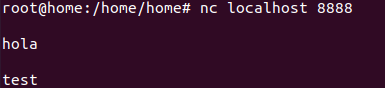
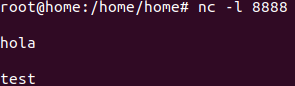
Send packet using bash:
echo -n "hello" >/dev/tcp/localhost/8888Mount cifs/samba share inside container
#Dockerfile
FROM ubuntu
RUN apt update -y
RUN apt install  cifs-utils -y
docker build -t cifs .docker run -it --cap-add SYS_ADMIN --cap-add DAC_READ_SEARCH -cap-add NET_BIND_SERVICE cifs bash#centos with privileged (working)
docker run --privileged -it --cap-add SYS_ADMIN --cap-add DAC_READ_SEARCH --cap-add NET_BIND_SERVICE centos bashmount -t cifs -o username=a,password=a //192.168.0.228/public /mntmount -t cifs -o username=a,password=a //192.168.0.228/public /mntmount -t cifs -o username=a,password=a,ro,domain=WORKGROUP //192.168.0.228/public /a -vGrafana docker compose
version: '3'
services:
  grafana:
    image: grafana/grafana
    container_name: grafana
    restart: unless-stopped
    environment:
      TZ: "Asia/Kolkata"
      GF_INSTALL_PLUGINS: "grafana-clock-panel,grafana-simple-json-datasource,simpod-json-datasource,marcusolsson-json-datasource"
    volumes:
      - /root/grafana/data:/var/lib/grafana
    ports:
      - 3000:3000
ELK on docker-compose
version: '2.2'
services:
  elasticsearch:
    image: docker.elastic.co/elasticsearch/elasticsearch:7.12.0
    container_name: elasticsearch
    environment:
      discovery.type: "single-node"
    volumes:
      - /root/elasticsearch:/usr/share/elasticsearch/data
    ports:
      - 9200:9200

  kibana:
    image: docker.elastic.co/kibana/kibana:7.12.0
    container_name: kibana
    environment:
      elasticsearch.hosts: "elasticsearch:9200"
    ports:
      - 5601:5601