rancher.yml
version: '3'
services:
  rancher:
    image: rancher/rancher:latest
    privileged: true
    restart: always
    container_name: rancher
    volumes:
      - /opt/docker/rancher:/var/lib/rancher
    ports:
      - 88:80
- 443:443rancher.yml
version: '3'
services:
rancher:
image: rancher/rancher:latest
privileged: true
restart: always
container_name: rancher
volumes:
- /opt/docker/rancher:/var/lib/rancher
ports:
- 88:80
- 443:4431.Create ssl certificate
openssl req \
    -new \
    -newkey rsa:4096 \
    -days 365 \
    -nodes \
    -x509 \
    -subj "/C=US/ST=Denial/L=Springfield/O=Dis/CN=example.com" \
    -keyout example.com.key \
    -out example.com.crt
2. Create pem from above key and cert
cat example.com.crt example.com.key > example.com.pem2.update haproxy.cfg
global
daemon
maxconn 256

defaults
    mode http
    timeout connect 5000ms
    timeout client 50000ms
    timeout server 50000ms

userlist http_basic_users
    group http_basic_users
    user admin insecure-password Your_Password groups http_basic_users

frontend http-in
    bind *:80
    acl example_acl hdr(host) -i example.initedit.com
    use_backend example_back if example_acl

backend example_back
    acl draw-auth http_auth(http_basic_users)
    http-request auth realm draw unless draw-auth
    server server1 192.168.0.150:8080

frontend https-in
    bind *:8889 ssl crt /usr/local/etc/haproxy/ssl/example.com.pem

    http-request redirect scheme https unless { ssl_fc }
    http-request set-header X-Forwarded-Proto https if { ssl_fc }
    http-request set-header X-Forwarded-Proto http if !{ ssl_fc }

    acl example_acl hdr(host) -i example.com
    use_backend example_back if example_acl

backend example_back
server server1 192.168.0.97:8443 check ssl verify noneMore :
https://gist.github.com/Iristyle/5005653
https://serverfault.com/questions/239749/possible-to-add-basic-http-access-authentication-via-haproxy
Create openfass serverless deployment
1.update faas-idler deployment in k8 from dryRun=true to dryRun=false
2.While deploying the openfass faas-idler add “com.openfaas.scale.zero=true”
sudo faas-cli deploy -f python-fn.yml --label "com.openfaas.scale.zero=true"jenkins.yml
version: '3'
services:
  jenkins:
    image: jenkins/jenkins
    user: root:root
    restart: always
    container_name: jenkins
    environment:
      TZ: "Asia/Kolkata"
    volumes:
      - /opt/docker/jenkins:/var/jenkins_home
    ports:
      - 8080:8080
start : docker-compose -f jenkins.yml up -d
stop : docker-compose -f jenkins.yml down
user mapping : https://dev.to/acro5piano/specifying-user-and-group-in-docker-i2e
mysql.yml
version: '3'
services:
  mysql:
    image: mysql
    restart: always
    container_name: mysql
    environment:
      MYSQL_ROOT_PASSWORD: "password"
    volumes:
      - /opt/docker/mysql:/var/lib/mysql
    ports:
      - 3306:3306
start : docker-compose -f mysql.yml up -d
stop : docker-compose -f mysql.yml down
postgres.yml
version: '3'
services:
  postgres:
    image: postgres
    restart: always
    container_name: postgres
    environment:
      POSTGRES_PASSWORD: "password"
    volumes:
      - /opt/docker/postgres:/var/lib/postgresql/data
    ports:
      - 5432:5432
start : docker-compose -f postgres.yml up -d
stop : docker-compose -f postgres.yml down
1.Install iotop
#centos/readhat
yum install iotop

#debian/ubuntu
apt install iotop
2.Run below command to check high disk io process
iotop -aoPa = append data
o = only running disk IO
P = process ID instead of Thread ID
3.Get the process ID
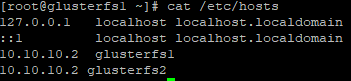
lsof -p Process_idglusterfs1 – 10.10.10.1
glusterfs2 – 10.10.10.2
add below entry into /etc/hosts
10.10.10.2 glusterfs1
10.10.10.1 glusterfs2
– Add 10GB of disk to both server(for eg. /dev/sdb)
– On both server
yum install centos-release-gluster -y

mkdir -p /bricks/brick1
mkfs.xfs  /dev/sdb

echo "/dev/sdb /bricks/brick1 xfs defaults 1 2" >> /etc/fstab
mount -a

yum install glusterfs-server -y
systemctl enable glusterd
systemctl start glusterd
systemctl status glusterd
-On glusterfs1
gluster peer probe glusterfs2-On glusterfs2
gluster peer probe glusterfs1-On any of one server
gluster volume create gv0 replica 2 glusterfs1:/bricks/brick1/gv0 glusterfs2:/bricks/brick1/gv0

gluster volume start gv0

gluster volume info
-Verify glusterfs mount
mkdir /mnt/gv0
mount -t glusterfs glusterfs1:/gv0 /mnt/gv0
Use glusterfs in Kubernetes-deployment
-install glusterfs client on all kubernetes node
yum install centos-release-gluster -y
yum install glusterfs -y
glusterfs-nginx-deployment.yml
apiVersion: apps/v1
kind: Deployment
metadata:
  name: gluster-nginx
spec:
  selector:
    matchLabels:
      run: gluster-nginx
  replicas: 1
  template:
    metadata:
      labels:
        run: gluster-nginx
    spec:
      containers:
      - name: gluster-nginx
        image: nginx
        ports:
        - containerPort: 80
        volumeMounts:
        - mountPath: "/mnt/glusterfs"
          name: glusterfsvol
      volumes:
      - name: glusterfsvol
        glusterfs:
          endpoints: glusterfs-cluster
path: 10.10.10.1:/gv0Note:
– for sonarqube 8 set sysctl -w vm.max_map_count=262144 on host machine
– Move all extensions jars from container to your extensions dir
1.postgress.yml
apiVersion: apps/v1
kind: Deployment
metadata:
  name: postgres-deployment
  labels:
    app: postgres
    env: prod
spec:
  replicas: 1
  selector:
    matchLabels:
      app: postgres
      env: prod
  template:
    metadata:
      labels:
        app: postgres
        env: prod
    spec:
      containers:
      - name: postgres-container
        image: postgres
        imagePullPolicy: IfNotPresent
        resources:
          requests:
            memory: "256Mi"
            cpu: "100m"
          limits:
            memory: "512Mi"
            cpu: "200m"
        env:
          - name: POSTGRES_PASSWORD
            value: "PASSWORD"
        volumeMounts:
          - name: postgres-data
            mountPath: /var/lib/postgresql/data
        ports:
        - containerPort: 5432
      volumes:
        - name: postgres-data
          nfs:
            server: 192.168.0.184
            path: "/opt/nfs1/postgres/data"
---
kind: Service
apiVersion: v1
metadata:
  name: postgres-service
  labels:
    app: postgres
    env: prod
spec:
  selector:
    app: postgres
    env: prod
  ports:
  - name: postgres
    protocol: TCP
    port: 5432
    targetPort: 5432
    nodePort: 30432
  type: NodePort
2.sonarqube.yml
apiVersion: apps/v1
kind: Deployment
metadata:
  name: sonarqube-deployment
  labels:
    app: sonarqube
    env: prod
spec:
  replicas: 1
  selector:
    matchLabels:
      app: sonarqube
      env: prod
  template:
    metadata:
      labels:
        app: sonarqube
        env: prod
    spec:
      containers:
      - name: sonarqube-container
        image: sonarqube:7.7-community
        imagePullPolicy: IfNotPresent
        env:
          - name: SONARQUBE_JDBC_USERNAME
            value: postgres
          - name: SONARQUBE_JDBC_PASSWORD
            value: "PASSWORD"
          - name: SONARQUBE_JDBC_URL
            value: jdbc:postgresql://postgres-service:5432/sonar
        resources:
          requests:
            memory: "1024Mi"
            cpu: "500m"
          limits:
            memory: "2048Mi"
            cpu: "1000m"
        volumeMounts:
          - name: sonarqube-conf
            mountPath: /opt/sonarqube/conf
          - name: sonarqube-data
            mountPath: /opt/sonarqube/data
          - name: sonarqube-logs
            mountPath: /opt/sonarqube/logs
          - name: sonarqube-extensions
            mountPath: /opt/sonarqube/extensions
        ports:
        - containerPort: 9000
      volumes:
        - name: sonarqube-conf
          nfs:
            server: 192.168.0.184
            path: "/opt/nfs1/sonarqube/conf"
        - name: sonarqube-data
          nfs:
            server: 192.168.0.184
            path: "/opt/nfs1/sonarqube/data"
        - name: sonarqube-logs
          nfs:
            server: 192.168.0.184
            path: "/opt/nfs1/sonarqube/logs"
        - name: sonarqube-extensions
          nfs:
            server: 192.168.0.184
            path: "/opt/nfs1/sonarqube/extensions"
---
kind: Service
apiVersion: v1
metadata:
  name: sonarqube-service
  labels:
    app: sonarqube
    env: prod
spec:
  selector:
    app: sonarqube
    env: prod
  ports:
  - name: sonarqube
    protocol: TCP
    port: 9000
    targetPort: 9000
    nodePort: 30900
  type: NodePort
Note: Create sonar database in postgres
https://stackoverflow.com/questions/16825331/disallow-anonymous-users-to-access-sonar1.elasticsearch.yml
apiVersion: apps/v1
kind: Deployment
metadata:
  name: elasticsearch-deployment
  labels:
    app: elasticsearch
    env: prod
spec:
  replicas: 1
  selector:
    matchLabels:
      app: elasticsearch
  template:
    metadata:
      name: elasticsearch-deployment
      labels:
        app: elasticsearch
    spec:
      containers:
      - name: elasticsearch
        image: elasticsearch:7.8.0
        imagePullPolicy: IfNotPresent
        resources:
          requests:
            memory: "1024Mi"
            cpu: "200m"
          limits:
            memory: "2048Mi"
            cpu: "500m"
        env:
          - name: discovery.type
            value: single-node
        volumeMounts:
          - name: elasticsearch-nfs
            mountPath: /usr/share/elasticsearch/data
        ports:
        - name: tcp-port
          containerPort: 9200
      volumes:
        - name: elasticsearch-nfs
          nfs:
            server: 192.168.0.184
            path: "/opt/nfs1/elasticsearch"

---
apiVersion: v1
kind: Service
metadata:
  name: elasticsearch-service
  labels:
    app: elasticsearch
    env: prod
spec:
  selector:
    app: elasticsearch
  type: NodePort
  ports:
  - name: elasticsearch
    port: 9200
    targetPort: 9200
    nodePort: 30061
2.kibana.yml
apiVersion: apps/v1
kind: Deployment
metadata:
  name: kibana-deployment
  labels:
    app: kibana
    env: prod
spec:
  replicas: 1
  selector:
    matchLabels:
      app: kibana
  template:
    metadata:
      name: kibana-deployment
      labels:
        app: kibana
    spec:
      containers:
      - name: kibana
        image: kibana:7.8.0
        imagePullPolicy: IfNotPresent
        resources:
          requests:
            memory: "512Mi"
            cpu: "200m"
          limits:
            memory: "1024Mi"
            cpu: "400m"
        env:
          - name: ELASTICSEARCH_HOSTS
            value: http://elasticsearch-service:9200
        volumeMounts:
          - name: kibana-nfs
            mountPath: /usr/share/kibana/data
        ports:
        - name: tcp-port
          containerPort: 5601
      volumes:
        - name: kibana-nfs
          nfs:
            server: 192.168.0.184
            path: "/opt/nfs1/kibana"

---
apiVersion: v1
kind: Service
metadata:
  name: kibana-service
  labels:
    app: kibana
    env: prod
spec:
  selector:
    app: kibana
  type: NodePort
  ports:
  - name: kibana
    port: 5601
    targetPort: 5601
    nodePort: 30063
3.logstash.yml
apiVersion: apps/v1
kind: Deployment
metadata:
  name: logstash-deployment
  labels:
    app: logstash
    env: prod
spec:
  replicas: 1
  selector:
    matchLabels:
      app: logstash
  template:
    metadata:
      name: logstash-deployment
      labels:
        app: logstash
    spec:
      containers:
      - name: logstash
        image: logstash:7.8.0
        imagePullPolicy: IfNotPresent
        resources:
          requests:
            memory: "512Mi"
            cpu: "200m"
          limits:
            memory: "1024Mi"
            cpu: "200m"
        env:
          - name: xpack.monitoring.elasticsearch.hosts
            value: http://elasticsearch-service:9200
        volumeMounts:
          - name: logstash-nfs
            mountPath: /usr/share/logstash/pipeline
        ports:
        - name: tcp-port
          containerPort: 5044
      nodeSelector:
        node: lp-knode-02
      volumes:
        - name: logstash-nfs
          nfs:
            server: 192.168.0.184
            path: "/opt/nfs1/logstash/pipeline"

---
apiVersion: v1
kind: Service
metadata:
  name: logstash-service
  labels:
    app: logstash
    env: prod
spec:
  selector:
    app: logstash
  type: NodePort
  ports:
  - name: logstash
    port: 5044
    targetPort: 5044
nodePort: 3006202-beats-input.conf
input {
  beats {
    port => 5044
  }
}
30-elasticsearch-output.conf
output {
  elasticsearch {
    hosts => ["http://elasticsearch-service:9200"]
    manage_template => false
    index => "%{[@metadata][beat]}-%{[@metadata][version]}-%{+YYYY.MM.dd}"
  }
}
10-syslog-filter.conf
filter {
  if [fileset][module] == "system" {
    if [fileset][name] == "auth" {
      grok {
        match => { "message" => ["%{SYSLOGTIMESTAMP:[system][auth][timestamp]} %{SYSLOGHOST:[system][auth][hostname]} sshd(?:\[%{POSINT:[system][auth][pid]}\])?: %{DATA:[system][auth][ssh][event]} %{DATA:[system][auth][ssh][method]} for (invalid user )?%{DATA:[system][auth][user]} from %{IPORHOST:[system][auth][ssh][ip]} port %{NUMBER:[system][auth][ssh][port]} ssh2(: %{GREEDYDATA:[system][auth][ssh][signature]})?",
                  "%{SYSLOGTIMESTAMP:[system][auth][timestamp]} %{SYSLOGHOST:[system][auth][hostname]} sshd(?:\[%{POSINT:[system][auth][pid]}\])?: %{DATA:[system][auth][ssh][event]} user %{DATA:[system][auth][user]} from %{IPORHOST:[system][auth][ssh][ip]}",
                  "%{SYSLOGTIMESTAMP:[system][auth][timestamp]} %{SYSLOGHOST:[system][auth][hostname]} sshd(?:\[%{POSINT:[system][auth][pid]}\])?: Did not receive identification string from %{IPORHOST:[system][auth][ssh][dropped_ip]}",
                  "%{SYSLOGTIMESTAMP:[system][auth][timestamp]} %{SYSLOGHOST:[system][auth][hostname]} sudo(?:\[%{POSINT:[system][auth][pid]}\])?: \s*%{DATA:[system][auth][user]} :( %{DATA:[system][auth][sudo][error]} ;)? TTY=%{DATA:[system][auth][sudo][tty]} ; PWD=%{DATA:[system][auth][sudo][pwd]} ; USER=%{DATA:[system][auth][sudo][user]} ; COMMAND=%{GREEDYDATA:[system][auth][sudo][command]}",
                  "%{SYSLOGTIMESTAMP:[system][auth][timestamp]} %{SYSLOGHOST:[system][auth][hostname]} groupadd(?:\[%{POSINT:[system][auth][pid]}\])?: new group: name=%{DATA:system.auth.groupadd.name}, GID=%{NUMBER:system.auth.groupadd.gid}",
                  "%{SYSLOGTIMESTAMP:[system][auth][timestamp]} %{SYSLOGHOST:[system][auth][hostname]} useradd(?:\[%{POSINT:[system][auth][pid]}\])?: new user: name=%{DATA:[system][auth][user][add][name]}, UID=%{NUMBER:[system][auth][user][add][uid]}, GID=%{NUMBER:[system][auth][user][add][gid]}, home=%{DATA:[system][auth][user][add][home]}, shell=%{DATA:[system][auth][user][add][shell]}$",
                  "%{SYSLOGTIMESTAMP:[system][auth][timestamp]} %{SYSLOGHOST:[system][auth][hostname]} %{DATA:[system][auth][program]}(?:\[%{POSINT:[system][auth][pid]}\])?: %{GREEDYMULTILINE:[system][auth][message]}"] }
        pattern_definitions => {
          "GREEDYMULTILINE"=> "(.|\n)*"
        }
        remove_field => "message"
      }
      date {
        match => [ "[system][auth][timestamp]", "MMM  d HH:mm:ss", "MMM dd HH:mm:ss" ]
      }
      geoip {
        source => "[system][auth][ssh][ip]"
        target => "[system][auth][ssh][geoip]"
      }
    }
    else if [fileset][name] == "syslog" {
      grok {
        match => { "message" => ["%{SYSLOGTIMESTAMP:[system][syslog][timestamp]} %{SYSLOGHOST:[system][syslog][hostname]} %{DATA:[system][syslog][program]}(?:\[%{POSINT:[system][syslog][pid]}\])?: %{GREEDYMULTILINE:[system][syslog][message]}"] }
        pattern_definitions => { "GREEDYMULTILINE" => "(.|\n)*" }
        remove_field => "message"
      }
      date {
        match => [ "[system][syslog][timestamp]", "MMM  d HH:mm:ss", "MMM dd HH:mm:ss" ]
      }
    }
  }
}