git fetch --all
OR
git remote update
Note: It will not update local repo.
To pull all branch
git pull --allNote: It will update local repo.
git fetch --all
OR
git remote updateNote: It will not update local repo.
To pull all branch
git pull --allNote: It will update local repo.
docker run -d -p 26900:26900/udp -p 27020:27020/udp -p 27015:27015/udp -p 27015:27015 -e ADMIN_STEAM=0:1:1234566 --name cs cs16ds/server:latest
For interactive docker terminal change the entry point:docker run it --entrypoint /bin/bash --name cs cs16ds/server:latest
mkdir cs
cd cs
wget https://steamcdn-a.akamaihd.net/client/installer/steamcmd_linux.tar.gz
tar xvfz steamcmd_linux.tar.gz
sudo apt-get install lib32gcc1
./steamcmd.sh
login anonymous
force_install_dir ./cs16/
app_update 90 validate (run till you get fully installed message)
exit
cd cs16server
./hlds_run -console -game cstrike +port 27015 +de_dust2 +maxplayers 32 -pingboost 1
Install addons:
amxmodx dproto metamod
https://wiki.alliedmods.net/Installing_AMX_Mod_X_Manually
Note: path for metamod.so should not be absolute.
http://www.amxmod.net/doc/amxmod_2010.1/en/amxusers.html
By default ssh password login is disabled on above cloud provider
To enable SSH root login edit /etc/ssh/sshd_config and enable below options and restart sshd service.PasswordAuthentication yes
PermitRootLogin yes
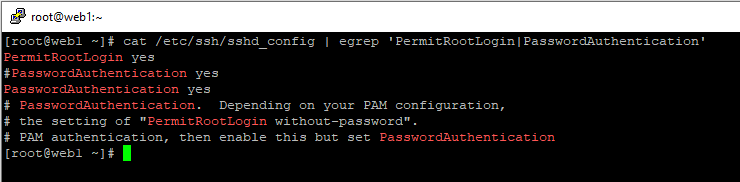
Restart SSH Servicesystemctl restart sshd
# Install Prometheus https://prometheus.io/download/wget https://github.com/prometheus/prometheus/releases/download/v2.13.1/prometheus-2.13.1.linux-amd64.tar.gztar -xf prometheus-2.13.1.linux-amd64.tar.gznano /etc/systemd/system/prometheus.service
mv prometheus-2.13.1.linux-amd64 /etc/prometheus
[Unit]
Description=Prometheus
Wants=network-online.target
After=network-online.target
[Service]
User=root
Group=root
Type=simple
ExecStart=/usr/local/bin/prometheus \
–config.file /etc/prometheus/prometheus.yml \
–storage.tsdb.path /var/lib/prometheus/ \
–web.console.templates=/etc/prometheus/consoles \
–web.console.libraries=/etc/prometheus/console_libraries
[Install]
WantedBy=multi-user.target
cd /etc/prometheus
cp prometheus promtool tsdb /usr/local/bin/
systemctl daemon-reload
systemctl enable prometheus
systemctl start prometheus
Prometheus port : 9090
# Install node_exporter
wget https://github.com/prometheus/node_exporter/releases/download/v0.18.1/node_exporter-0.18.1.linux-amd64.tar.gz
tar -xf node_exporter-0.18.1.linux-amd64.tar.gz
cp node_exporter-0.18.1.linux-amd64 /node_exporter /usr/local/bin/
nano /etc/systemd/system/node_exporter.service
[Unit]
Description=Node Exporter
Wants=network-online.target
After=network-online.target
[Service]
User=root
Group=root
Type=simple
ExecStart=/usr/local/bin/node_exporter
[Install]
WantedBy=multi-user.target
systemctl daemon-reload
systemctl start node_exporter
systemctl status node_exporter
systemctl enable node_exporter
# add node_exporter to prometheus.yml
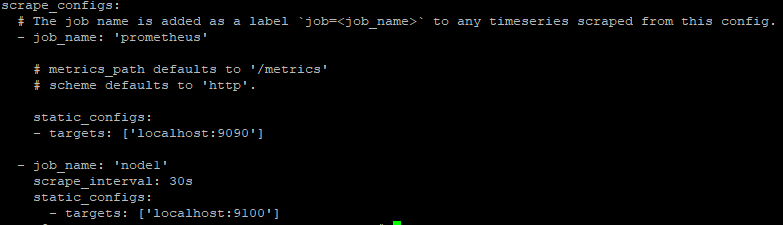
systemctl restart prometheus
iptables -A INPUT -p tcp --dport 22 -s 192.168.0.10 -j ACCEPT
iptables -A INPUT -p tcp --dport 22 -s 10.16.10.10 -j ACCEPT
iptables -A INPUT -p tcp --dport 22 -j DROP
#Drop All rules
iptables -F
Note : gitlab should be same version.
Manual backup:
/etc/gitlab/gitlab-secrets.json
/etc/gitlab/gitlab.rb
Generate backup:
gitlab-rake gitlab:backup:create
Restore backup:
You have run sudo gitlab-ctl reconfigure at least once.
GitLab is running. If not, start it using sudo gitlab-ctl start.
gitlab-ctl stop unicorn
gitlab-ctl stop sidekiq
gitlab-rake gitlab:backup:restore BACKUP=335565885_2019_05_20.6
restore /etc/gitlab/gitlab-secrets.json and /etc/gitlab/gitlab.rb
Install required Package
apt-get install -y sssd realmd sssd-tools sssd libnss-sss libpam-sss adcli packagekit
Domain controller : ldap.ldap.example.com
Domain : ldap.example.com
Realm : ldap.example.com
realm -v discover ldap.ldap.example.com
realm -v join ldap.ldap.example.com
TEST
id test@ldap.example.com
post_max_size = 10M
upload_max_filesize = 10M
3. Restart apache2 service.
systemctl restart apache2