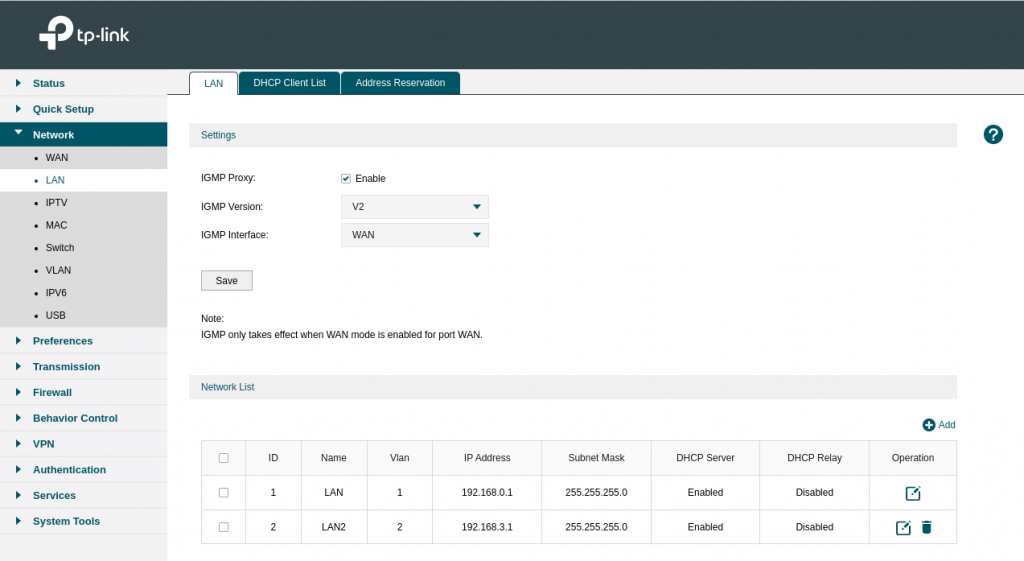
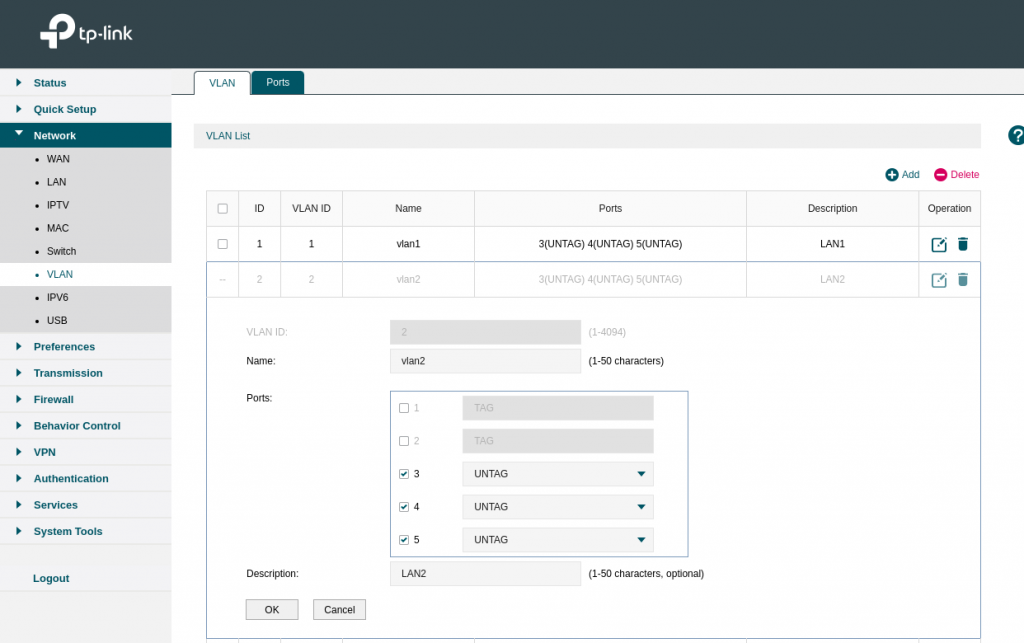
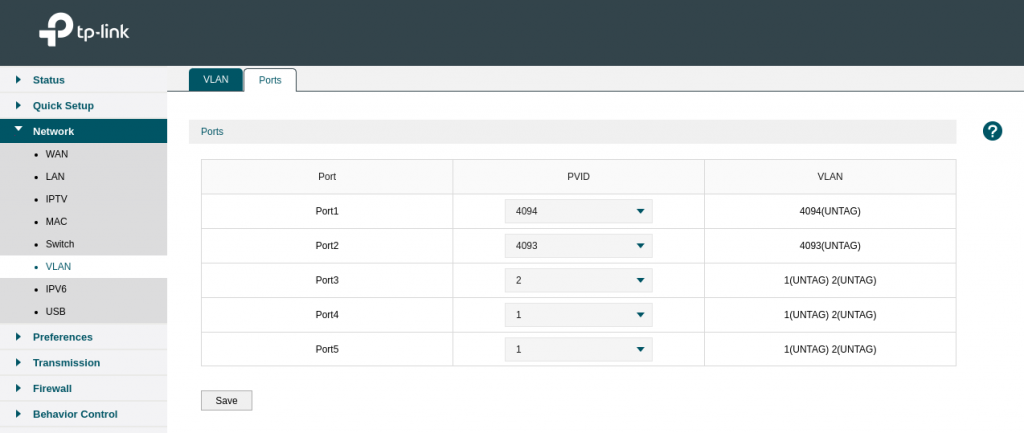
- How we can assign different ip subnet for ports


#ARM64
arm64_image_digest=$(docker manifest inspect nginx | jq '.manifests[] | select(.platform.architecture == "arm64")' | jq '.digest'| sed 's/"//g')
#AMD64
amd64_image_digest=$(docker manifest inspect nginx | jq '.manifests[] | select(.platform.architecture == "arm64")' | jq '.digest'| sed 's/"//g')
docker tag nginx your-username/nginx:amd64
docker tag nginx your-username/nginx:arm64
docker push your-username/nginx:amd64
docker push your-username/nginx:arm64
docker manifest create \
your-username/nginx:latest \
--amend your-username/nginx:amd64 \
--amend your-username/nginx:arm64
docker manifest push your-username/nginx:latest
https://www.docker.com/blog/multi-arch-build-and-images-the-simple-way/
export DOCKER_BUILDKIT=1
docker buildx create --use
docker buildx build --push --platform linux/arm64,linux/amd64 -t httpd-custom .
docker buildx stop
docker buildx rm
##10 0.064 .buildkit_qemu_emulator: /bin/sh: Invalid ELF image for this architecture
docker run --rm --privileged multiarch/qemu-user-static:register --reset
docker run --rm --privileged multiarch/qemu-user-static --reset -p yes
docker buildx rm builder
docker buildx create --name builder --driver docker-container --use
docker buildx inspect --bootstrap
set-x = print actual shell command
set -f = disable filename expansion [ ls *.yml ]
errexit = fails all script if any exit code arrives
pipefail = Failes multi Pipe statement if any false statement
set -x -f -o errexit -o pipefail
set +x +f +e
https://stackoverflow.com/questions/68465355/what-is-the-meaning-of-set-o-pipefail-in-bash-script
https://www.newline.co/courses/newline-guide-to-bash-scripting/errexit
https://unix.stackexchange.com/questions/333867/what-does-set-f-in-korn-shell-do

WISP = Own DHCP
Client+AP = Upstream Wifi DHCP
sudo pip install pyserial
https://raw.githubusercontent.com/espressif/arduino-esp32/gh-pages/package_esp32_index.json

const char* ssid = "TP-Link_573B";
const char* password = "passowrd";
Youtube video : https://www.youtube.com/watch?v=UuxBfKA3U5M
pin out : https://www.studiopieters.nl/esp32-pinout/

Power consumption with 1 LED: 5V x 0.08Amp = 0.4 Watt
if grafana is running on https and you do not add below setting it will give HTTP ERROR 400
nginx.ingress.kubernetes.io/backend-protocol: "HTTPS"
grafana.ini aur default.ini for root_urlroot_url = https://grafana.example.com
image:
repository: grafana/grafana
tag: 8.5.2
persistence:
enabled: true
type: statefulset
resources:
limits:
cpu: 500m
memory: 512Mi
requests:
cpu: 500m
memory: 512Mi
grafana.ini:
app_mode: test
paths:
data: /var/lib/grafana/
logs: /var/log/grafana
plugins: /var/lib/grafana/plugins
provisioning: /etc/grafana/provisioning
temp_data_lifetime: 24h
server:
protocol: https
domain: grafana.example.com
enforce_domain: false
root_url: https://grafana.example.com/
serve_from_sub_path: false
cert_file: /var/lib/grafana/cert/dev.crt
cert_key: /var/lib/grafana/cert/dev.key
database:
type: postgres
host: database-hostname
name: grafana
user: grafana
password: ${grafana_eks_postgres_password}
ssl_mode: disable
security:
cookie_secure: true
allow_embedding: true
strict_transport_security: true
strict_transport_security_max_age_seconds: 31536000
strict_transport_security_preload: true
strict_transport_security_subdomains: true
x_content_type_options: true
x_xss_protection: true
smtp:
enabled: true
host: email-smtp.ap-south-1.amazonaws.com:25
user: ${grafana_smtp_username}
password: ${grafana_smtp_password}
#skip_verify = true
from_address: exam@example.com
from_name: test
readinessProbe:
httpGet:
path: /api/health
port: 3000
scheme: HTTPS
livenessProbe:
httpGet:
path: /api/health
port: 3000
scheme: HTTPS
initialDelaySeconds: 60
timeoutSeconds: 30
failureThreshold: 10
ingress:
enabled: true
annotations:
kubernetes.io/ingress.class: nginx
nginx.ingress.kubernetes.io/proxy-connect-timeout: "600"
nginx.ingress.kubernetes.io/proxy-read-timeout: "600"
nginx.ingress.kubernetes.io/proxy-send-timeout: "600"
route53mapper: enabled
nginx.ingress.kubernetes.io/backend-protocol: HTTPS
labels:
app: grafana
path: /
pathType: ImplementationSpecific
hosts:
- grafana.example.com
helm upgrade --install grafana grafana/grafana --version 6.32.6 --set image.tag=8.5.2 --set persistence.enabled=true --set persistence.type=statefulset --set persistence.storageClassName=gp2
helm upgrade --install grafana grafana/grafana --version 6.32.6 -f values.taml
helm repo add kubecost https://kubecost.github.io/cost-analyzer/
helm upgrade --install kubecost kubecost/cost-analyzer prometheus.server.persistentVolume.enabled=false --namespace kubecost --create-namespace
Dockerfile
FROM rust:slim-buster as build
ARG ARCH
WORKDIR opt
RUN rustup target add $ARCH-unknown-linux-musl
RUN apt update && apt install git -y
RUN git clone https://github.com/atanunq/viu
WORKDIR viu
RUN cargo build --target $ARCH-unknown-linux-musl --release
RUN cp /viu/target/$ARCH-unknown-linux-musl/release/viu /usr/bin
FROM alpine:3.15.0
COPY --from=build /opt/viu/target/$ARCH-unknown-linux-musl/release/viu /usr/bin
ENTRYPOINT ["viu"]
podman build -t viu --build-arg ARCH=x86_64 .
docker run -it -v $(pwd):/opt viu "/opt/img/bfa.jpg"

root@lp-arm-4:~# dmesg | grep -i vid
--More--
[ 13.071843] bcm2835-isp bcm2835-isp: Device node output[0] registered as /dev/video13
[ 13.615235] bcm2835-isp bcm2835-isp: Device node capture[0] registered as /dev/video14
[ 13.615709] bcm2835-isp bcm2835-isp: Device node capture[1] registered as /dev/video15
[ 13.616053] bcm2835-isp bcm2835-isp: Device node stats[2] registered as /dev/video16
[ 13.626826] bcm2835-codec bcm2835-codec: Device registered as /dev/video10
[ 13.631504] bcm2835-codec bcm2835-codec: Device registered as /dev/video11
[ 13.667772] : bcm2835_codec_get_supported_fmts: port has more encoding than we provided space for. Some are dropped.
[ 13.702795] bcm2835-v4l2: V4L2 device registered as video0 - stills mode > 1280x720
[ 13.708226] bcm2835-v4l2: Broadcom 2835 MMAL video capture ver 0.0.2 loaded.
[ 13.744213] bcm2835-codec bcm2835-codec: Device registered as /dev/video12
--More--
apt install libraspberrypi-bin
vcgencmd get_camera
systemctl stop docker
dnf remove docker-ce -y
dnf install containerd -y
sudo mkdir -p /etc/containerd
containerd config default | sudo tee /etc/containerd/config.toml
systemctl start containerd
systemctl enable containerd
KUBELET_KUBEADM_ARGS="--pod-infra-container-image=k8s.gcr.io/pause:3.5 --container-runtime=remote --container-runtime-endpoint=unix:///run/containerd/containerd.sock"
OR
KUBELET_KUBEADM_ARGS="--container-runtime=remote --container-runtime-endpoint=unix:///run/containerd/containerd.sock"
echo 'runtime-endpoint: unix:///run/containerd/containerd.sock' > /etc/crictl.yaml
systemctl start containerd
#[ERROR FileContent--proc-sys-net-bridge-bridge-nf-call-iptables]: /proc/sys/net/bridge/bridge-nf-call-iptables does not exist
#[ERROR FileContent--proc-sys-net-ipv4-ip_forward]: /proc/sys/net/ipv4/ip_forward contents are not set to 1
lsmod | grep -i netfilter
modprobe br_netfilter
echo 1 > /proc/sys/net/ipv4/ip_forward
echo 'net.bridge.bridge-nf-call-ip6tables = 1
net.bridge.bridge-nf-call-iptables = 1' > /etc/sysctl.d/k8s.conf
Remove CNI binary form /opt/cni/bin/*
rm -rf /opt/cni/bin/*
For Ubuntu 22.04 need to install containernetworking-plugins:
failed to load CNI config list file /etc/cni/net.d/10-calico.conflist: error parsing configuration list: unexpected end of JSON input: invalid cni config: failed to load
apt install containernetworking-plugins
#crontab entry for ubuntu
@reboot modprobe br_netfilter
@reboot echo 1 > /proc/sys/net/ipv4/ip_forward
Note : weaves CNI had issue with containerd , k8 1.24 I uninstalled it.
It’s working with calico CNI
vi /etc/containerd/config.toml
SystemdCgroup = true

/boot/firmware/cmdline.txt and append this linecgroup_enable=cpuset cgroup_enable=memory
root@lp-arm-2:~# cat /proc/cmdline
coherent_pool=1M 8250.nr_uarts=0 snd_bcm2835.enable_headphones=0 cgroup_disable=memory .....
grep memory /proc/cgroups
dmesg | grep 'Kernel command line'
strings /boot/kernel8.img | grep cgroup_disable