kubernetes 1.23 to 1.24 ,1.25, 1.26, 27, 28, 29 upgrade

  • install containerd and remove docker
systemctl stop docker
dnf remove docker-ce -y

dnf install containerd -y

sudo mkdir -p /etc/containerd
containerd config default | sudo tee /etc/containerd/config.toml
systemctl start containerd
systemctl enable containerd
  • edit /var/lib/kubelet/kubeadm-flags.env add below
KUBELET_KUBEADM_ARGS="--pod-infra-container-image=k8s.gcr.io/pause:3.5 --container-runtime=remote --container-runtime-endpoint=unix:///run/containerd/containerd.sock"

OR
KUBELET_KUBEADM_ARGS="--container-runtime=remote --container-runtime-endpoint=unix:///run/containerd/containerd.sock"
  • edit /etc/crictl.yaml to remove crictl warning message
echo 'runtime-endpoint: unix:///run/containerd/containerd.sock' > /etc/crictl.yaml
systemctl start containerd


#[ERROR FileContent--proc-sys-net-bridge-bridge-nf-call-iptables]: /proc/sys/net/bridge/bridge-nf-call-iptables does not exist
#[ERROR FileContent--proc-sys-net-ipv4-ip_forward]: /proc/sys/net/ipv4/ip_forward contents are not set to 1

lsmod | grep -i netfilter
modprobe br_netfilter

echo 1 > /proc/sys/net/ipv4/ip_forward

echo 'net.bridge.bridge-nf-call-ip6tables = 1
net.bridge.bridge-nf-call-iptables = 1' > /etc/sysctl.d/k8s.conf

Remove CNI binary form /opt/cni/bin/*

rm -rf /opt/cni/bin/*

For Ubuntu 22.04 need to install containernetworking-plugins:

failed to load CNI config list file /etc/cni/net.d/10-calico.conflist: error parsing configuration list: unexpected end of JSON input: invalid cni config: failed to load

apt install containernetworking-plugins

#crontab entry for ubuntu 

@reboot modprobe br_netfilter
@reboot echo 1 > /proc/sys/net/ipv4/ip_forward

Note : weaves CNI had issue with containerd , k8 1.24 I uninstalled it.

It’s working with calico CNI

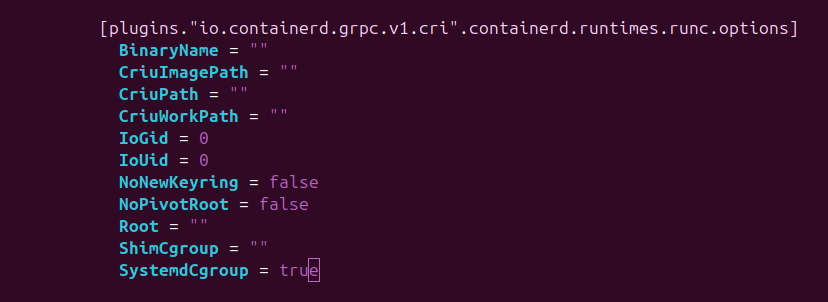
  • For new containerd version above 1.5.9
vi /etc/containerd/config.toml

SystemdCgroup = true
  • For Raspberry pi edit /boot/firmware/cmdline.txt and append this line
cgroup_enable=cpuset cgroup_enable=memory
  • Kernal 6.12.40-v8+ has some issues with cgroup_enable=memory need to switch to 6.6
root@lp-arm-2:~# cat /proc/cmdline
coherent_pool=1M 8250.nr_uarts=0 snd_bcm2835.enable_headphones=0 cgroup_disable=memory .....

grep memory /proc/cgroups
dmesg | grep 'Kernel command line'
strings /boot/kernel8.img | grep cgroup_disable

kuberntes upgrade useful command

kubectl drain ip-10-222-110-231.eu-west-1.compute.internal --delete-emptydir-data="true" --ignore-daemonsets="true" --timeout="15m" --force
kubectl get nodes --label-columns beta.kubernetes.io/instance-type --label-columns beta.kubernetes.io/capacity-type -l role=worker
  • deleted pod automatically

#send output to env_output.tail
for i in $(cat qa.node); 
do echo "draining node : $i"
kubectl drain $i  --delete-emptydir-data="true" --ignore-daemonsets="true" --timeout="15m" --force >> env_output.tail 2>&1
echo "completed node : $i"
done

#read env_output.tail to delete pod
while(true)
do
pods=$(tail -n 20 env_output.tail | grep "error when evicting" | cut -d '(' -f1 | awk -F 'evicting' '{print $2}' | uniq | awk '{print $1,$2,$3}')
echo pods: $pods
apod=$(echo "$pods" | sed 's/"//g')
echo apod: $apod
echo "kubectl delete $apod"
kubectl delete $apod
sleep 5
done
#namespace=$(kubeclt get ns | tr "\n" " ")
namespace="abc xyz"

for ns in $namespace
do
    deploy=$(kubectl get deploy -n $ns | grep -v '0/' | awk '{print $1}' | sed 1d)
    for i in $deploy
    do
        kubectl -n $ns patch deployment $i -p '{"spec": {"template": {"spec": {"containers": [{"name": "'$i'","resources": { "requests": {"cpu": "100m"}}}]}}}}'
        echo "patched : $i ns=$ns"
    done
done

https://faun.pub/kubectl-commands-cheatsheet-43ce8f13adfb

rysnc –partial , -P is awesome


[home@home Downloads]$ time rsync -parvP ubuntu-20.04.4-live-server-amd64.iso root@192.168.0.183:/tmp
sending incremental file list
ubuntu-20.04.4-live-server-amd64.iso
    646,053,888  48%   11.15MB/s    0:01:00  ^C
rsync error: unexplained error (code 255) at rsync.c(703) [sender=3.2.3]

real	0m56.958s
user	0m6.159s
sys	0m2.564s


[home@home Downloads]$ time rsync -parvP ubuntu-20.04.4-live-server-amd64.iso root@192.168.0.183:/tmp
sending incremental file list
ubuntu-20.04.4-live-server-amd64.iso
  1,331,691,520 100%   20.02MB/s    0:01:03 (xfr#1, to-chk=0/1)

sent 658,982,006 bytes  received 178,830 bytes  9,765,345.72 bytes/sec
total size is 1,331,691,520  speedup is 2.02

real	1m6.846s
user	0m27.066s
sys	0m1.862s
[home@home Downloads]$ time rsync -parv ubuntu-20.04.4-live-server-amd64.iso root@192.168.0.183:/tmp
sending incremental file list
ubuntu-20.04.4-live-server-amd64.iso

sent 1,332,016,766 bytes  received 35 bytes  11,633,334.51 bytes/sec
total size is 1,331,691,520  speedup is 1.00

real	1m54.871s
user	0m6.400s
sys	0m3.748s

kubernetes ingress with TLS

  • Create self signed cert
openssl req \
    -new \
    -newkey rsa:4096 \
    -days 365 \
    -nodes \
    -x509 \
    -subj "/C=US/ST=Denial/L=Springfield/O=Dis/CN=example.com" \
    -keyout example.com.key \
    -out example.com.cert
  • Create k8 certificate using above cert
kubectl create secret tls example-cert \
  --key="example.com.key" \
  --cert="example.com.cert"
  • ingress.yaml file
apiVersion: networking.k8s.io/v1
kind: Ingress
metadata:
  annotations:
    kubernetes.io/ingress.class: "haproxy"
    haproxy.org/rewrite-target: "/"
  name: prometheus-ingress
spec:
  rules:
  - host: prometheus.example.com
    http:
      paths:
      - path: /
        pathType: Prefix
        backend:
          service:
            name: prometheus-service
            port:
              number: 9090
 tls:
 - secretName: example-cert
   hosts:
   - prometheus.example.com

AWS Lambda to stop ec2 instance with cron

  • Create aws lambda function
  • Attach IAM role as required
import boto3
region = 'ap-south-1'
instances = ['i-0e4e6863cd3da57b5']
ec2 = boto3.client('ec2', region_name=region)
def lambda_handler(event, context):
    ec2.stop_instances(InstanceIds=instances)
    print('stopped your instances: ' + str(instances))
  • Create Cloudwatch event bus rule and attach it to lambda function

integrate openvpn with AD

  • install openvpn-auth-ldap package
yum install openvpn-auth-ldap
  • /etc/openvpn/server/server.conf

local 192.168.0.183
port 1194
proto udp
dev tun
ca ca.crt
cert server.crt
key server.key
dh dh.pem
auth SHA512
tls-crypt tc.key
topology subnet
push "redirect-gateway def1 bypass-dhcp"
server 10.8.0.0 255.255.255.0
ifconfig-pool-persist ipp.txt
push "dhcp-option DNS 8.8.8.8"
push "dhcp-option DNS 8.8.4.4"
keepalive 10 120
cipher AES-256-CBC
user nobody
group nogroup
persist-key
persist-tun
verb 3
crl-verify crl.pem
explicit-exit-notify
plugin /usr/lib/openvpn/openvpn-auth-ldap.so "/etc/openvpn/auth/ldap.conf"
verify-client-cert none
log /var/log/openvpn/openvpn.log
log-append /var/log/openvpn/openvpn.log
  • /etc/openvpn/auth/ldap.conf
<LDAP>
URL ldap://ad.example.com:389
BindDN CN=openvpn-svc,CN=Users,DC=example,DC=com
Password pass@123

Timeout 15
TLSEnable no

FollowReferrals yes
TLSCACertFile /etc/ssl/certs/ca-certificates.crt
TLSCACertDir /etc/ssl/certs

</LDAP>

<Authorization>

BaseDN "CN=Users,DC=example,DC=com"
SearchFilter "(&(SamAccountName=%u))"
RequireGroup true

<Group>
BaseDN "CN=Users,DC=example,DC=com"
SearchFilter "(cn=openvpn-group)"
MemberAttribute "member"
</Group>

</Authorization>
  • client-cert.ovpn
client
dev tun
proto udp
remote <publicip> 1194
resolv-retry infinite
nobind
persist-key
persist-tun
remote-cert-tls server
auth SHA512
cipher AES-256-CBC
ignore-unknown-option block-outside-dns
auth-user-pass
verb 3
<ca>
Masked
</ca>
<cert>
Masked
</cert>
<key>
Masked
</key>
<tls-crypt>
Masked
</tls-crypt>

AD powershell command to get user and group details

Get-ADUser -Identity openvpn-svc -Properties *

Get-ADGroup openvpn-group -Properties * 

Look at distinguished name and see the correct path

optimize your binary file size with strip command

Strip command strips the symbols form object file.

strip /path/to/binaryfile

strip -s /path/to/binaryfile

# on strip debug symbols

strip --strip-debug example

To view all symbols in binary(readelf)

readelf -s /path/to/binaryfile

nm command:

nm /path/to/binaryfile

More